
Summary: Daming walks through Simbatch Support Agent v4.0 and its multi-model router in 6 screenshots: 7-site inbox tags, 8-intent triage, ticket #94494 review, 45 SOP toggles, and FAST/DEEP routing.
Key Takeaways
This operational record follows Daming's daily store-monitoring workflow in Simbatch: (1) checking live email counts across 7 standalone stores, bidirectional Gmail Sent sync, and 8-category intent triage that isolates promo spam; (2) reviewing real order-tracking ticket #94494 side by side with a Chinese direct translation, L1 tracking-match decision chain, and bilingual draft; (3) tuning System Prompts and toggling 45 brand SOPs live inside the decoupled v4.0 config center; and (4) managing five model lanes—local Qwen, Gemini, DeepSeek, GPT, and Qwen Cloud—in the AI Runtime console with FAST/DEEP routing, SHA-256 idempotency caching, and cross-provider failover.
Hi everyone, I'm Daming. After getting our three-pane email workbench and 4PX freight reconciliation running, I did not force our support team to drop Gmail overnight. Instead, we ran a dual-track transition: teammates kept replying in Gmail while Simbatch synced both Gmail's Inbox and Sent folders every minute. That let the system learn real human phrasing into our knowledge base while I refined four daily pain points: seeing backlog across 7 stores at a glance, verifying in 2–3 seconds that tracking numbers in AI drafts came from real database lookups rather than hallucinations, updating SOP rules without waiting for code deployments, and routing tasks across multiple model lanes without single-vendor lock-in or rate-limit stalls. Below are six redacted console screenshots from October 29, 2026.
Seven Stores on One Screen: Site Tag Counts and Eight-Intent Triage
When support emails from multiple stores land in one shared queue, it is hard to tell which flagship store has a post-promo surge of tracking inquiries, which new store has a handful of questions, and which messages are SEO outreach spam. To solve that, I added two filter bars at the top of the email workbench (Figures 1 and 2, aligned with Google Workspace Gmail API thread and label sync).
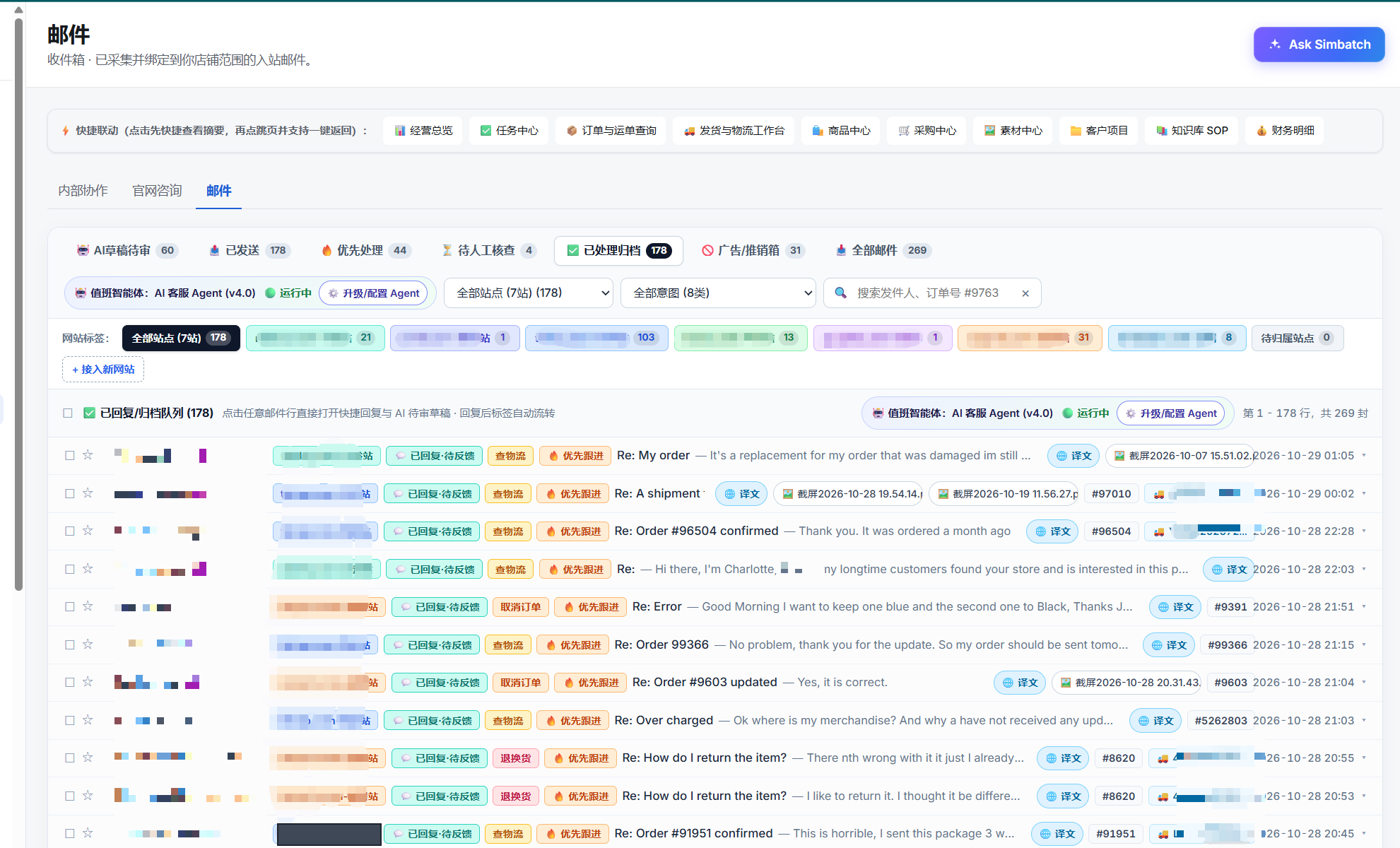
Every morning I scan the colored site pills first. Beyond All Sites (7 sites) 178, each of the seven storefronts displays live counts—103 on our main store, followed by 31, 21, 13, 8, 1, and 0 unassigned. Clicking any pill filters to that store immediately, and adding an 8th store only takes clicking + Connect New Site and entering the domain, support mailbox, and read-only Shopify order-lookup credentials. Status pills also stay synced with Gmail: once a teammate replies in Gmail, Simbatch marks the thread green (Replied · Awaiting Feedback) and archives it; if the buyer replies again two days later, it automatically surfaces with an orange Priority Follow-up badge.
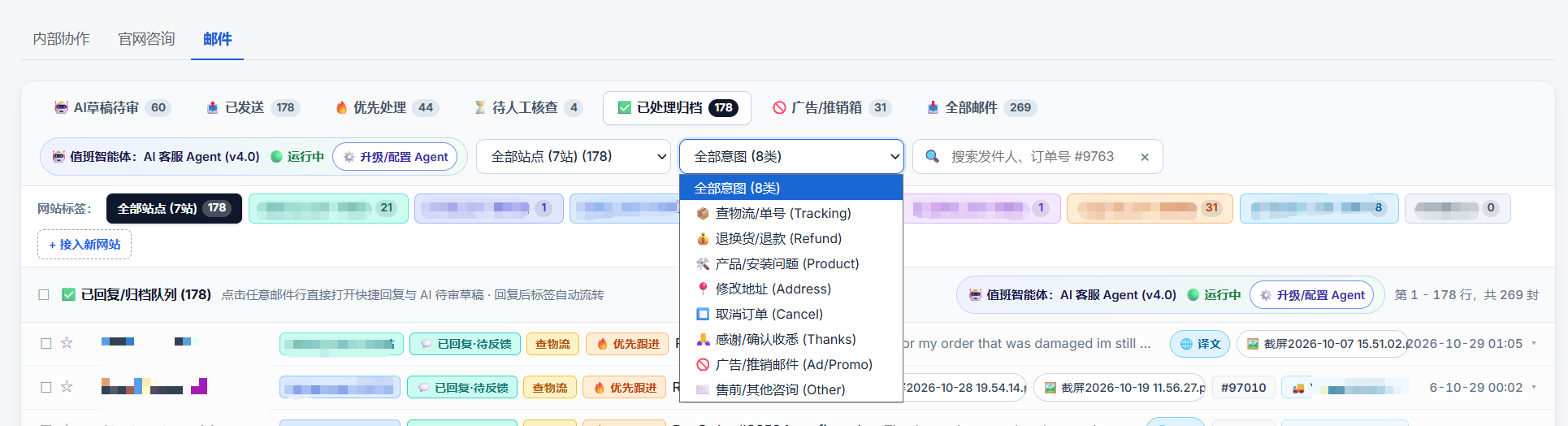
To batch similar tickets cleanly, inbound emails are classified on ingestion into eight categories: Tracking, Refund, Product, Address, Cancel, Thanks, Ad/Promo, and Other. Marketing pitches and influencer outreach (31 messages caught in Figure 1) are routed straight into the Ad/Promo bucket so they never clutter real customer inquiries.
How I Review a Tracking Inquiry: Source Text & Translation Left, Decision Chain & Bilingual Draft Right
Earlier AI draft tools felt risky because they only returned polished English text—you could not tell whether a tracking status came from a live database query or model guesswork without looking up the order yourself. So I enforced a strict rule in our review UI: opening any ticket must display lookup evidence, reasoning steps, and bilingual drafts side by side (Figure 3, backed by the Shopify Admin GraphQL API).
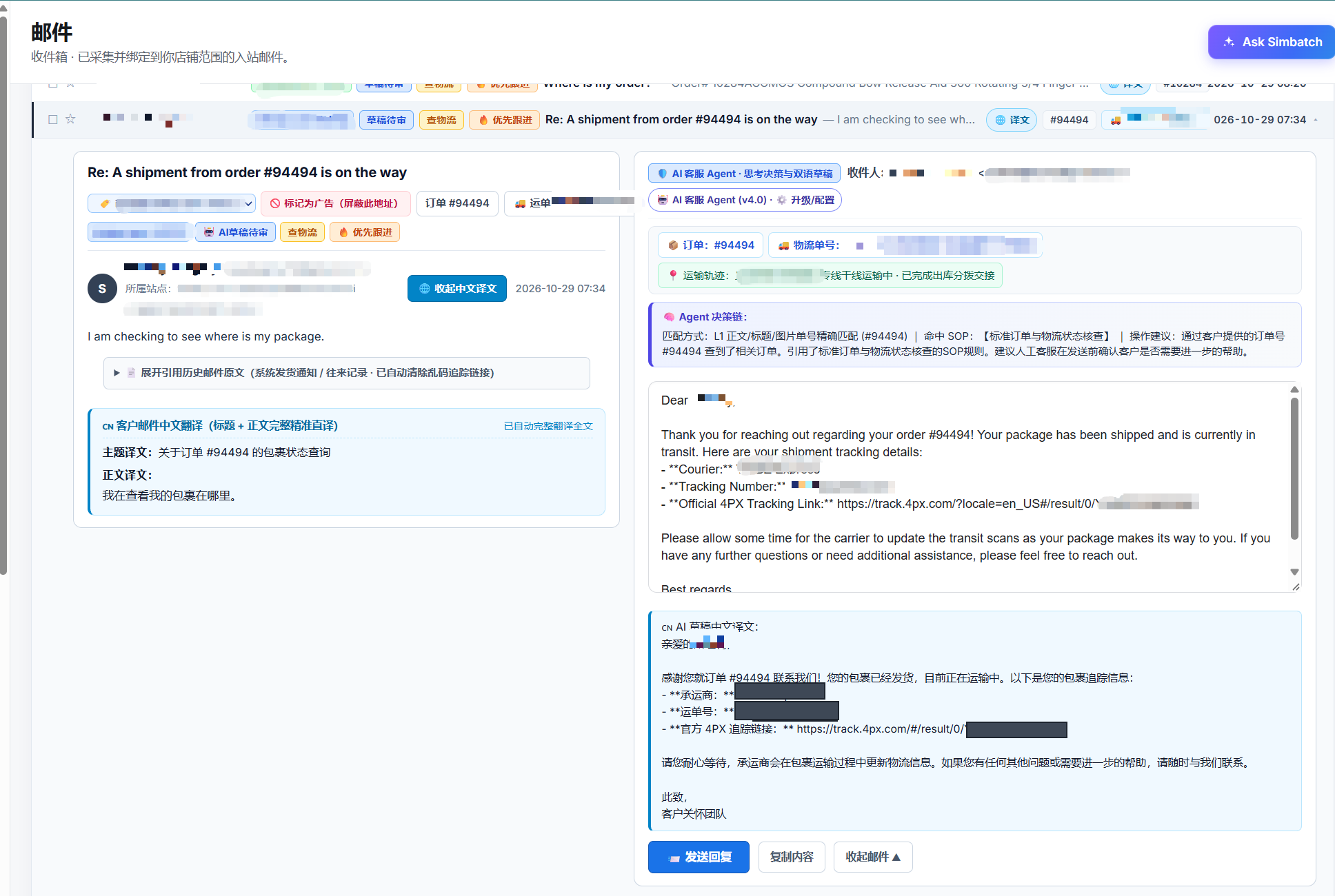
Taking real ticket #94494 as an example, the buyer wrote: "I am checking to see where is my package." In the left pane, noisy shipping-notification quotes and garbled 17track links are automatically folded away, and the blue card below shows the translated subject and body. In the right pane, I first check the top status pills: the four-tier lookup engine matched Order: #94494, pulled the real tracking number, and confirmed the live milestone (In transit · Outbound hub handover). Next, the purple Agent Decision Chain card states plainly: Match method: L1 body/subject/image exact order match (#94494) | Matched SOP: Standard Order & Logistics Status Check | Recommendation: Order #94494 located via customer-provided order ID; confirm whether further assistance is needed before sending. Finally, I check the English draft (which includes the official https://track.4px.com/... link) against its Chinese reference translation and click Send—taking three to four seconds end to end.
Updating Policies Without Developers: Editing Prompts and Toggling 45 SOPs in v4.0
Support policies shift constantly—from advising customers on mounting suction cups to explaining a 24–48 hour pre-dispatch window for address edits. Waiting on developers to edit code and redeploy for every wording tweak slows operations down. So I separated AI Support Agent (simbatch_cs_agent · v4.0) into a standalone configuration panel opened directly from the workbench header (Figure 4).
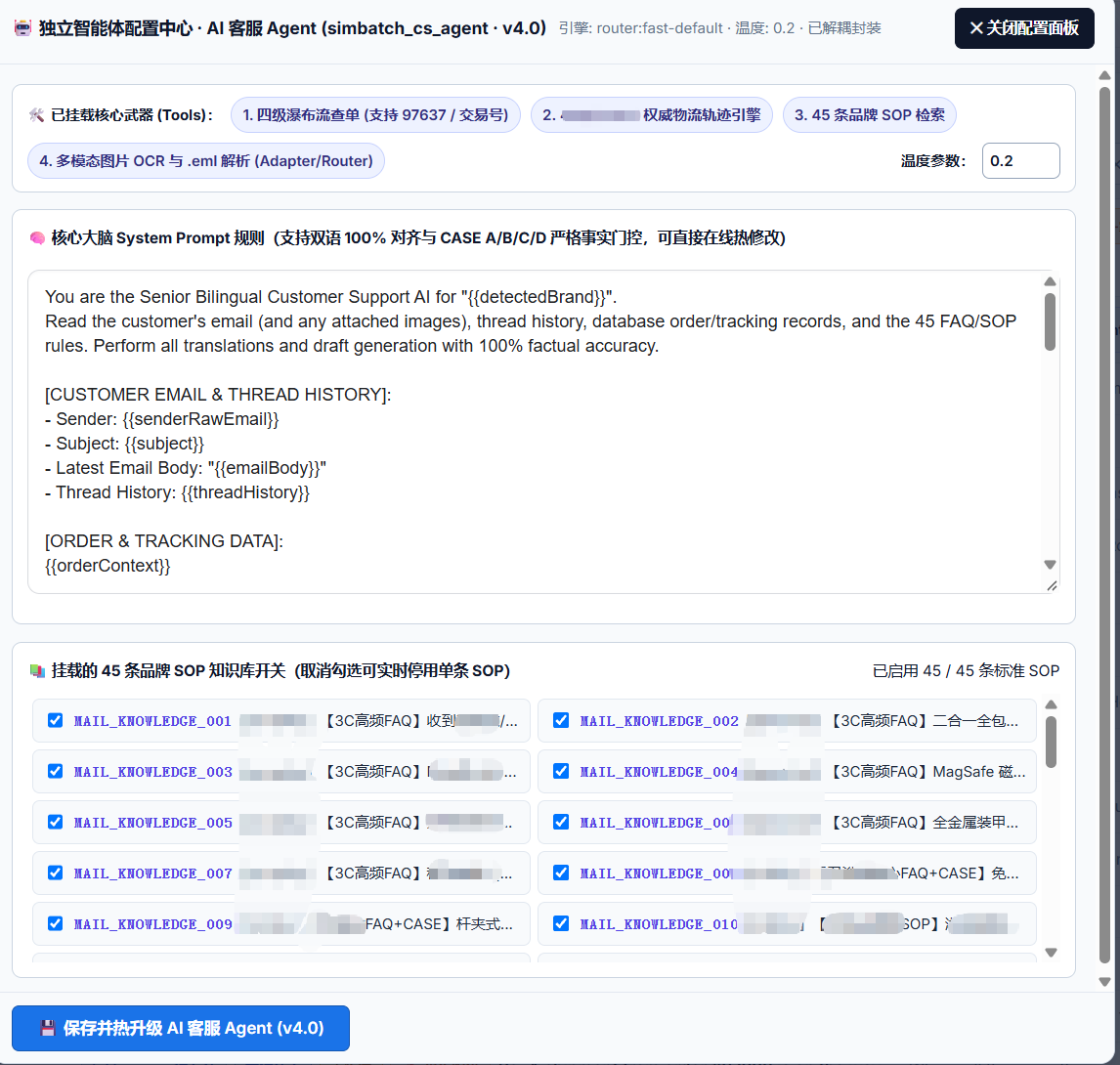
At the top are four mounted verification tools: 4-tier waterfall order lookup (by order number, email, and PayPal transaction ID), the authoritative tracking engine, 45-SOP retrieval, and multimodal image OCR plus .eml parsing for customer damage photos or payment screenshots—all with generation temperature locked at 0.2. In the middle box, I edit core CASE A/B/C/D rules (such as always including official 4PX links when tracking exists, and strictly forbidding fabricated shipping claims when no order is found). At the bottom, 45 brand SOPs (MAIL_KNOWLEDGE_001 through 045) distilled from store FAQs and strong human replies can be toggled on or off with checkboxes and applied immediately via "Save & Hot-Upgrade."
Inside the AI Runtime Console: Balancing Speed and Cost With 5 Model Lanes and FAST/DEEP Routing
Once translation, bilingual support drafts, attachment OCR, product image retouching, and marketing copy were all running across 7 stores, binding everything to one model vendor's API would be both expensive and fragile. Following Simbatch's core architecture rule, all models connect through replaceable Adapters and a unified Router managed inside the AI Runtime console (Figures 5 and 6; see OpenAI Prompt Caching and Google Gemini Context Caching).
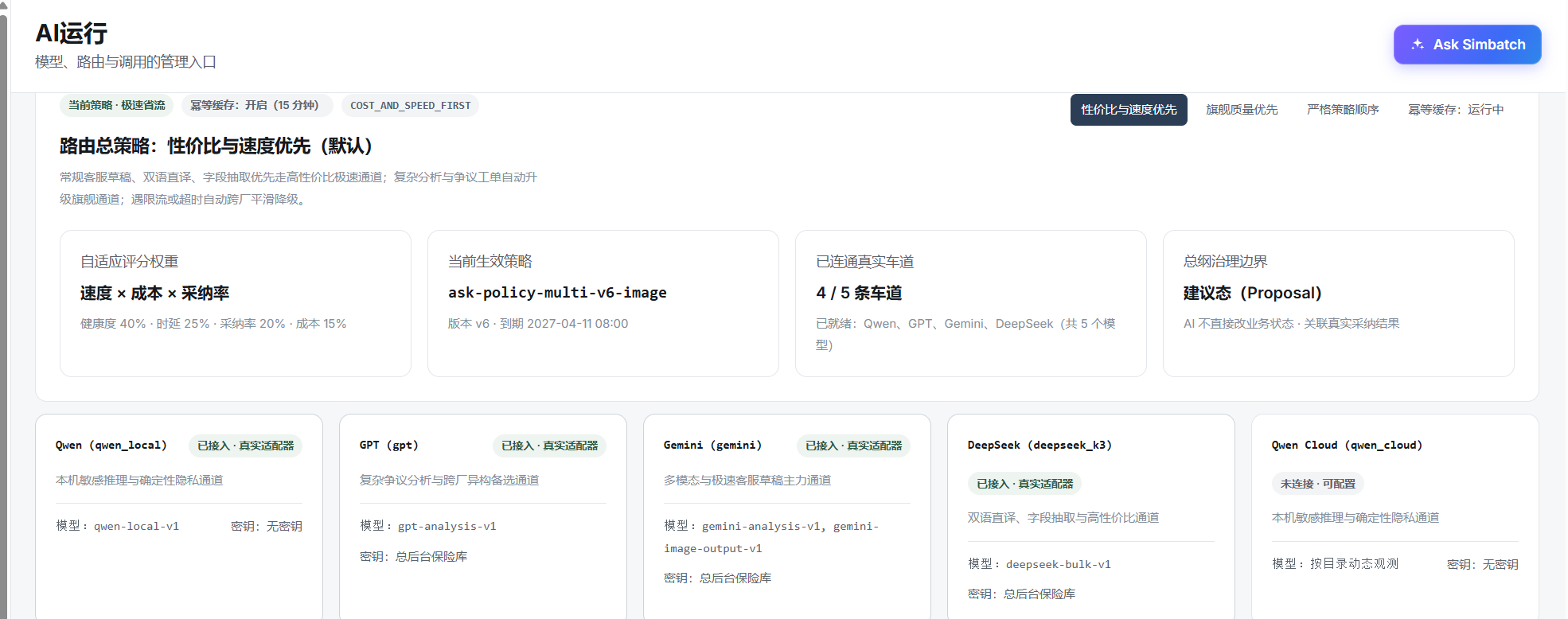
The four cards at the top of Figure 5 summarize runtime health: dynamic selection based on health, latency, and human adoption rate; active policy ask-policy-multi-v6-image with a 15-minute idempotency cache and a speed-vs-quality override selector; 4 / 5 lanes ready; and our strict Proposal boundary ensuring no AI model can mutate orders or send customer emails without human confirmation. Below sit five decoupled lanes: local Qwen (qwen_local) running Qwen3.5-9B for sensitive-data masking and zero-API-cost deterministic tasks, alongside GPT (gpt), Gemini (gemini), DeepSeek (deepseek_k3), and backup Qwen Cloud (qwen_cloud), with all credentials locked in the central vault.
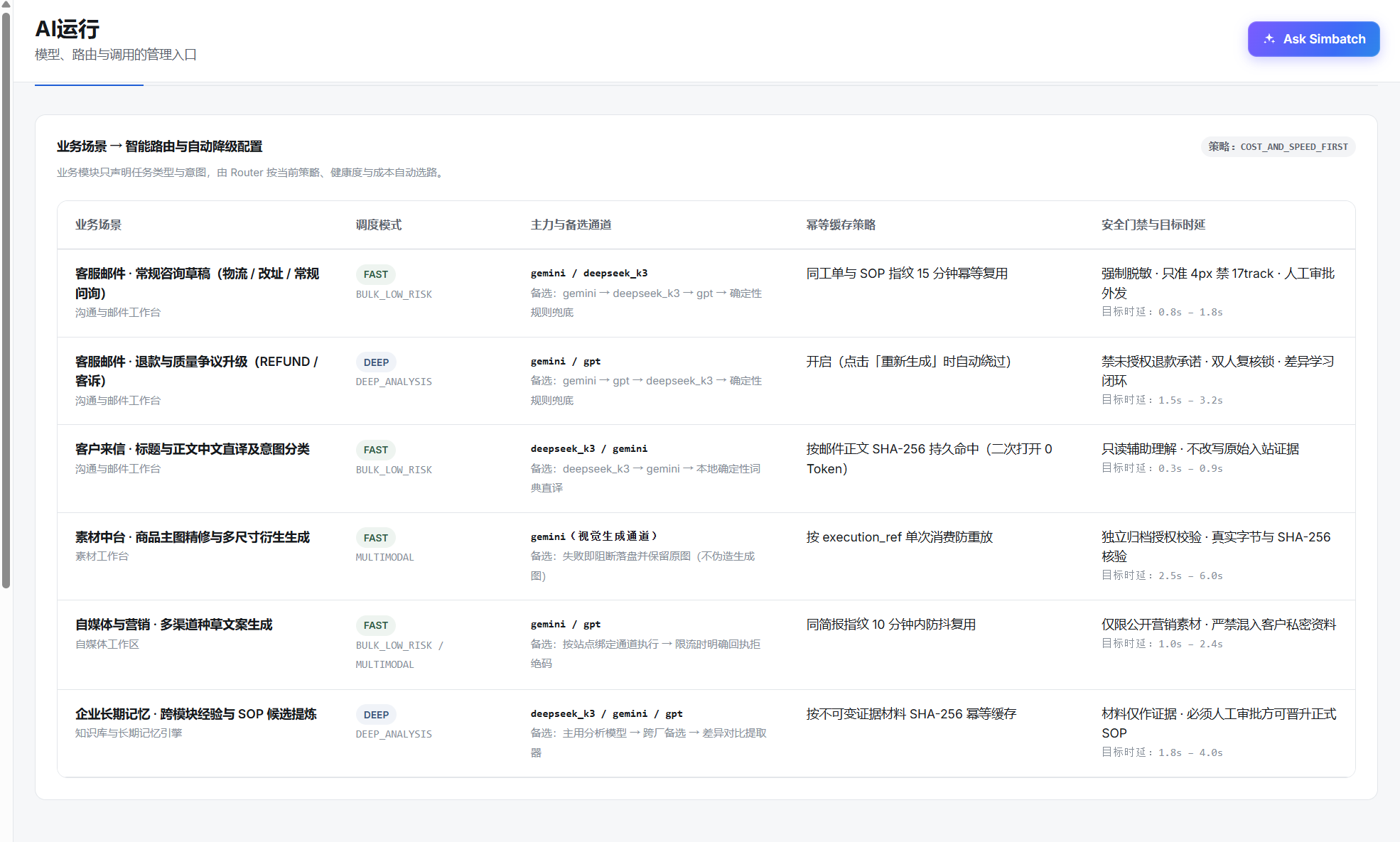
| Business Scenario | Tier | Primary & Fallback Chain | Idempotency Cache Policy | Safety Gate & Target Latency |
|---|---|---|---|---|
| Support Email · Routine Drafts (Tracking / Address / FAQ) | FAST (BULK_LOW_RISK) | gemini / deepseek_k3 (fallback gpt → deterministic rules) | 15-min idempotent reuse per ticket & SOP fingerprint | Mandatory masking · 4PX links only, no 17track · Human approval required (0.8s - 1.8s) |
| Support Email · Refund & Quality Escalations | DEEP (DEEP_ANALYSIS) | gemini / gpt (fallback deepseek_k3 → deterministic rules) | Enabled by default (bypassed on Regenerate) | No unauthorized refund promises · Two-person review lock · Diff learning loop (1.5s - 3.2s) |
| Inbound Email · Chinese Translation & Intent Triage | FAST (BULK_LOW_RISK) | deepseek_k3 / gemini (fallback local deterministic glossary) | Persistent DB hit by body SHA-256 | Read-only comprehension aid · Preserves original inbound evidence (0.3s - 0.9s) |
| Asset Hub · Hero Image Retouch & Multi-Size Variants | FAST (MULTIMODAL) | gemini (vision lane) | Single-consume replay guard via execution_ref | Archive auth check · Byte & SHA-256 verification (2.5s - 6.0s) |
| Social & Marketing · Multi-Channel Copy | FAST (BULK_LOW_RISK / MULTIMODAL) | gemini / gpt | 10-min debounce reuse per brief fingerprint | Public assets only · Customer PII strictly excluded (1.0s - 2.4s) |
| Enterprise Memory · Cross-Module SOP Candidate Extraction | DEEP (DEEP_ANALYSIS) | deepseek_k3 / gemini / gpt | Idempotent cache by immutable evidence SHA-256 | Evidence-only inputs · Human approval required to promote to SOP (1.8s - 4.0s) |
In daily use, this setup keeps both speed and token cost under control: inbound emails are translated in under a second and cached persistently by body SHA-256 so reopening a ticket costs zero duplicate tokens; over 80% of routine tracking and address tickets finish in roughly 1 second on the FAST lane with safety gates blocking unapproved links; and refund or quality escalations automatically promote to DEEP with two-person review locks and cross-provider failover if any upstream API throttles.
Official Reference Sources
This article documents the Simbatch team's internal system engineering practices. Check official platform API and caching specifications below (compiled October 29, 2026):
FAQ
While the support team is still transitioning from Gmail, how does Simbatch keep statuses from conflicting?
A scheduled background sync scans both Gmail's inbox and sent (in:sent) threads every minute. Whenever a teammate replies in Gmail, Simbatch captures the outbound message, updates the ticket to Replied · Awaiting Feedback, archives it, and extracts proven tracking formats and replies as knowledge candidates. If the customer follows up later, the ticket automatically receives a Priority Follow-up badge and returns to the active queue.
Why split business tasks into FAST and DEEP routing modes?
Different tasks have different latency and reasoning needs. Over 80% of daily emails across our 7 stores are routine tracking lookups, address checks, or sizing questions where the facts are straightforward—the FAST lane drafts bilingual replies in around a second. Complex refund disputes, quality complaints, or cross-module memory extraction escalate automatically to DEEP with two-person review locks.
Do I need a server restart or developer deployment to disable an SOP in the v4.0 Config Center?
No. In AI Support Agent (v4.0), mounted tools, temperature parameters, System Prompt rules, and all 45 brand SOP toggles are decoupled from application code and stored in configuration tables. Unchecking an outdated SOP or editing a rule and clicking Save & Hot-Upgrade updates the next incoming draft immediately.
Will the support workbench stall if one LLM provider's API rate-limits or goes down?
No. Simbatch never hardcodes business logic to a single vendor SDK—local Qwen, Gemini, DeepSeek, and GPT connect through unified Adapters and the Router. When a primary lane throttles or times out, the Router automatically falls back across providers and, in extreme cases, to deterministic local rule templates so drafting never stops.