
Summary: Real Shopify admin screenshots explaining the differences between Shopify Capital financing, Sidekick AI assistance, and Shopify Payments, including eligibility rules, metric scopes, and operational boundaries.
Overview
Shopify Capital provides business financing to eligible merchants, Sidekick assists with day-to-day store operations, and Shopify Payments handles customer checkout payments and related payout management. Each solves a different problem and comes with its own eligibility requirements.
In an earlier note on building a Shopify store with AI, I mentioned that launching a storefront has become much easier than before. Once the store is live, however, the questions you deal with every day are cash flow, analytics, and how customers pay.
Below, I use three real screenshots to unpack these three tools clearly. Note that the three screenshots separately capture a financing offer page, an AI-assisted analytics conversation, and a sign-up promotion page—they do not represent a single store completing every step at the same time.
| Feature | Primary Function | What to Check Before Using |
|---|---|---|
| Shopify Capital | Business financing for eligible merchants; offers loans in the US market | Eligibility, fees, remittance rate, and full agreement terms |
| Shopify Sidekick | In-admin AI assistant for querying data, generating reports, drafting content, and running approved actions | Accessible data, store permissions, and whether changes require confirmation |
| Shopify Payments | Accepts customer payments and manages transactions, refunds, and payouts inside Shopify admin | Supported country/region, business & identity requirements, bank account, and payout status |
Official references: Capital Eligibility, Sidekick Help & Guidance, Shopify Payments Onboarding.
1. What Is Shopify Capital, and Does a US Company Automatically Qualify?
Shopify Capital is a financing program for eligible merchants. Forming a US company does not automatically qualify a store for a US loan.
Shopify evaluates factors such as sales history, store tenure, disputes, and policy compliance. Applying for a US loan also involves requirements around actual business location, banking, and US residency of the account representative. Always check Shopify Capital's official eligibility documentation.
Even if an offer appears in your admin, the next step is reviewing the terms and submitting an application. Seeing an offer does not mean the funds are approved or deposited.
How Should You Read the $1,800 in This Screenshot?
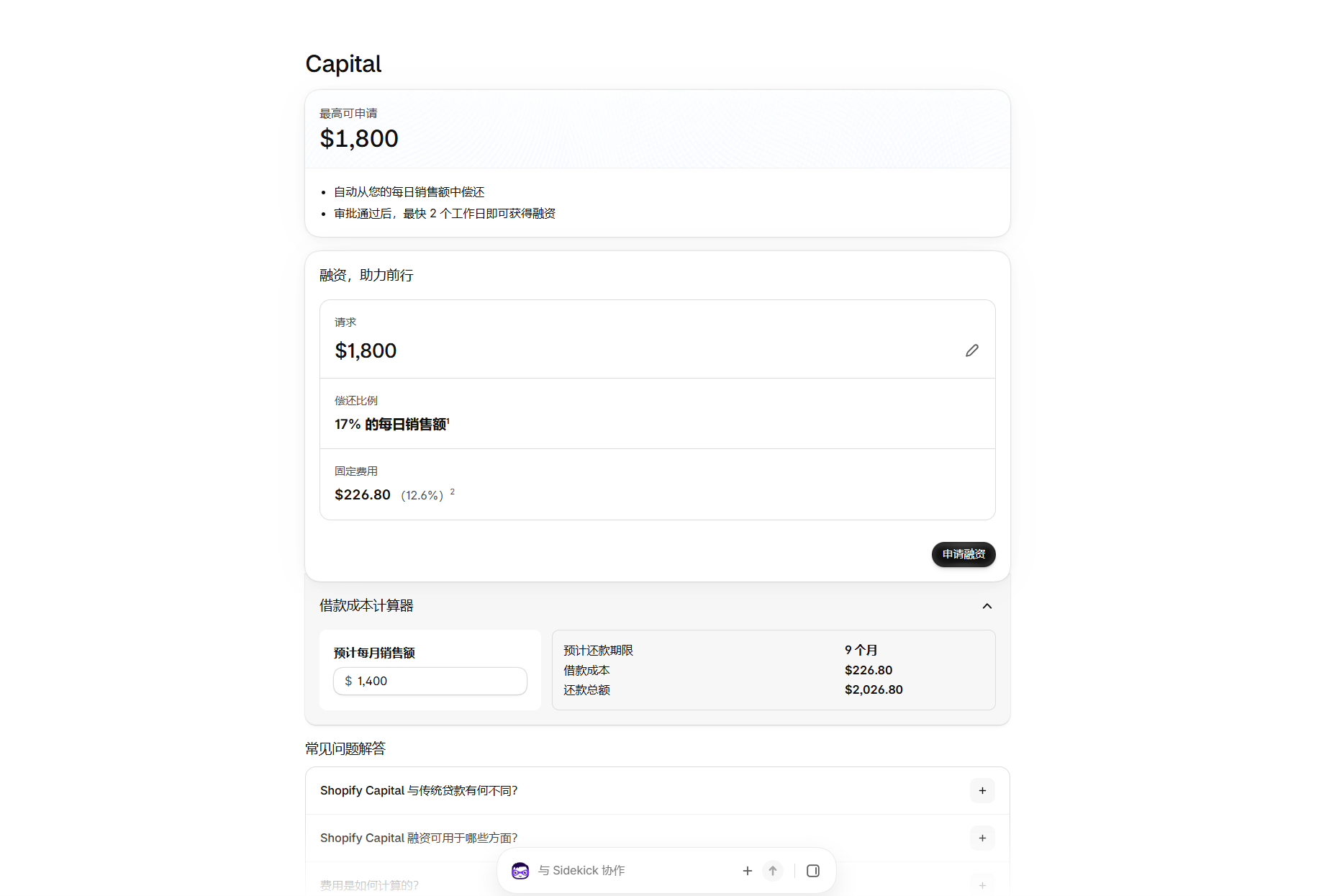
Breaking down the numbers on the page is far more useful than simply saying "Shopify offers loans":
| Field | Shown on Screen | What It Means |
|---|---|---|
| Maximum eligible | $1,800 | Application cap shown on this screen; not proof of final approval |
| Requested amount | $1,800 | The currently selected application amount |
| Remittance rate | 17% of daily sales | Percentage of daily sales remitted toward repayment—not profit sharing or an interest rate |
| Fixed fee | $226.80 (12.6%) | Borrowing fee for this offer; 12.6% is not an APR |
| Estimated monthly sales | $1,400 | Input value used inside the cost calculator |
| Estimated repayment term | 9 months | Estimate derived from the calculator input, not a guaranteed contract duration |
| Total to remit | $2,026.80 | Combined principal and fixed fee displayed on screen |
The math on the screen is straightforward: $1,800 + $226.80 = $2,026.80. How long repayment actually takes depends on real sales volume, contract terms, and minimum payment requirements—not just the calculator's estimate.
For example, if eligible daily sales on a given day are $100, a 17% remittance rate equals $17 going toward repayment. The remaining cash still has to cover inventory, shipping, ads, and refunds. Evaluating whether financing makes sense requires modeling that remittance inside your store's full cash flow.
Does the Limit Keep Increasing, and Can You Withdraw Anytime?
Do not treat Capital like a wallet whose limit only goes up and can be tapped on demand. Official documentation notes that eligibility and offer amounts fluctuate; even after accepting an offer, applications undergo review and may be adjusted or declined.
The screen notes "receive funds in as little as 2 business days after approval"—neither "after approval" nor "as little as" should be overlooked. This screenshot only proves the application UI displayed that notice, not that funds were disbursed.
This example shows a fixed-fee structure. Other fee structures exist in the US market, so always review the actual offer and full contract in your own admin instead of treating one screenshot as universal terms. See US Shopify Capital Loans and Repayments.
2. What Can Shopify Sidekick Help Merchants Do?
Sidekick is Shopify's built-in AI assistant that helps merchants query store data, generate reports, and assist with content and admin tasks.
According to Shopify's official documentation, practical everyday uses include:
- Analyzing store performance: Building queries, checking sales and related metrics, displaying charts, and exporting reports.
- Organizing products and content: Assisting with creating or editing products, discounts, and collections.
- Assisting with storefront and search updates: Helping adjust theme settings in supported areas and suggesting page title or meta description edits.
In my view, AI is most valuable first for cutting down time spent digging through reports and formatting material, and second for helping operators spot issues faster. Whether it actually improves efficiency depends on output accuracy and whether the team adopts it in practice.
You can start with a specific, structured prompt:
Compare sales, order count, and refund amount over the past 30 days versus the prior 30 days, and list the products with the largest changes. State the date range, currency, and metric definitions; if any data cannot be read, say so explicitly. Provide analysis only—do not modify the store.
That is a sample prompt template to try, not a test record executed in this article. Whenever real edits are involved, review what the assistant plans to change before confirming; Shopify also states that Sidekick will not make store changes without merchant approval (Sidekick setup & limits).
What Do the ChatGPT Visits and Orders in Screenshot 2 Show?
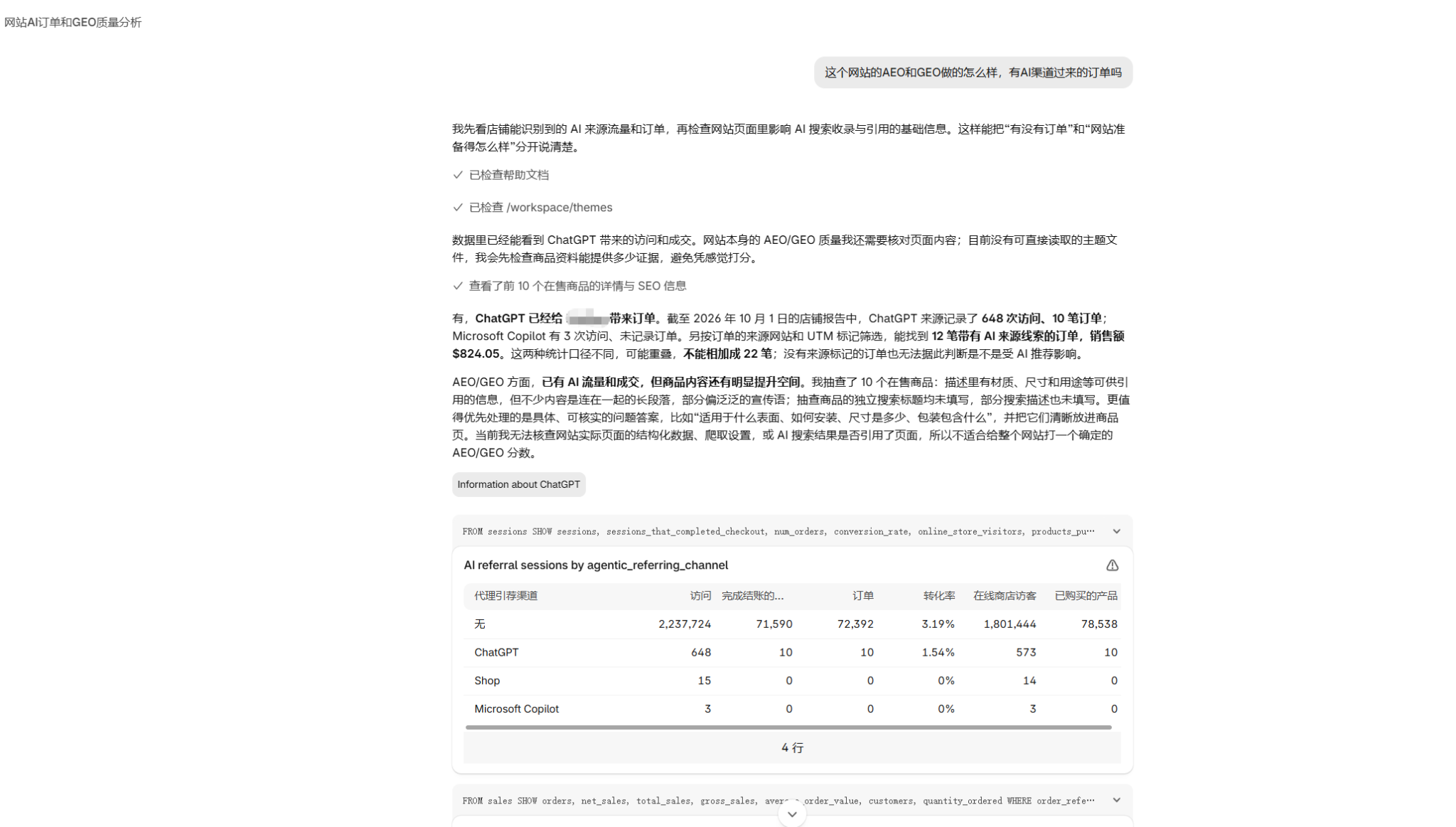
In this screenshot, the ChatGPT row of the referral report shows:
| Metric | Shown in Screenshot |
|---|---|
| Sessions / Visits | 648 |
| Online store visitors | 573 |
| Orders | 10 |
| Conversion rate | 1.54% |
In the same report, the Microsoft Copilot row shows 3 visits and 0 orders. Each channel row should be read separately rather than combined.
The report in the screenshot shows 648 visits and 10 recorded orders from the ChatGPT channel. Payment, refund, and fulfillment statuses for those orders are not shown in the image, making this an operational lead worth verifying further.
However, the full date filter range is not visible, so it cannot be labeled "this month's data" or "last 30 days," nor can it prove that any specific AI search or answer-engine optimization effort generated those orders.
Elsewhere in the conversation, filtering by referring site and UTM tags is said to find 12 orders with AI referral signals totaling $824.05 in sales. That is a separate scope mentioned in chat—without the raw report and full filter breakdown, it still requires verification. It may overlap with the 10 orders in the table, so they cannot be added together to make 22 orders or treated as 2 incremental orders. This article does not claim additional revenue from that figure.
For future reviews, I prefer keeping a single verifiable chain: reporting window → traffic source → landing page → matching orders → final business outcome. Clarify the data definitions first before deciding where to invest more content effort.
3. What Does Shopify Payments Do, and Is It Available Right After Opening a Store?
Shopify Payments processes customer payments and lets merchants manage transactions, refunds, and payouts inside Shopify admin. Registering a Shopify store does not mean you already meet the requirements for Shopify Payments.
We value it because checkout collection and store operations sit in the same admin, which streamlines daily work. That is my practical experience; actual eligibility depends on your store's region, product/business category, identity verification, and bank account rules (View onboarding requirements).
I check three states separately:
- Account status: Whether verification documents are approved and whether any action items remain in admin.
- Transaction status: Whether real orders are captured cleanly and whether refunds or disputes occur.
- Payout status: Whether funds have been scheduled/sent and actually landed in the bank account.
The three screenshots in this article do not show Shopify Payments verification, live transactions, or bank payout records, so they are not evidence that payouts are already running smoothly.
Is Shopify Payments Payout Timing Always 3–5 Days?
Do not treat one store's payout experience as a fixed timeline for every account. You need to check settlement windows, payout schedules, and bank processing times separately, and account review status can also affect fund release. Always refer to regional rules and your admin payout history (Shopify Payments payout timing).
When I casually describe a payment flow as "smooth and stable" on video, that reflects personal feel. For someone launching a store, what actually matters is checking your entity, products, and account requirements first, then validating a real transaction through to bank payout.
4. What Does Shopify's "$1 for the First 3 Months" Actually Mean?
The sign-up screen shown here offers a 3-day free trial, followed by $1/month for 3 months—not $1 total for all three months.
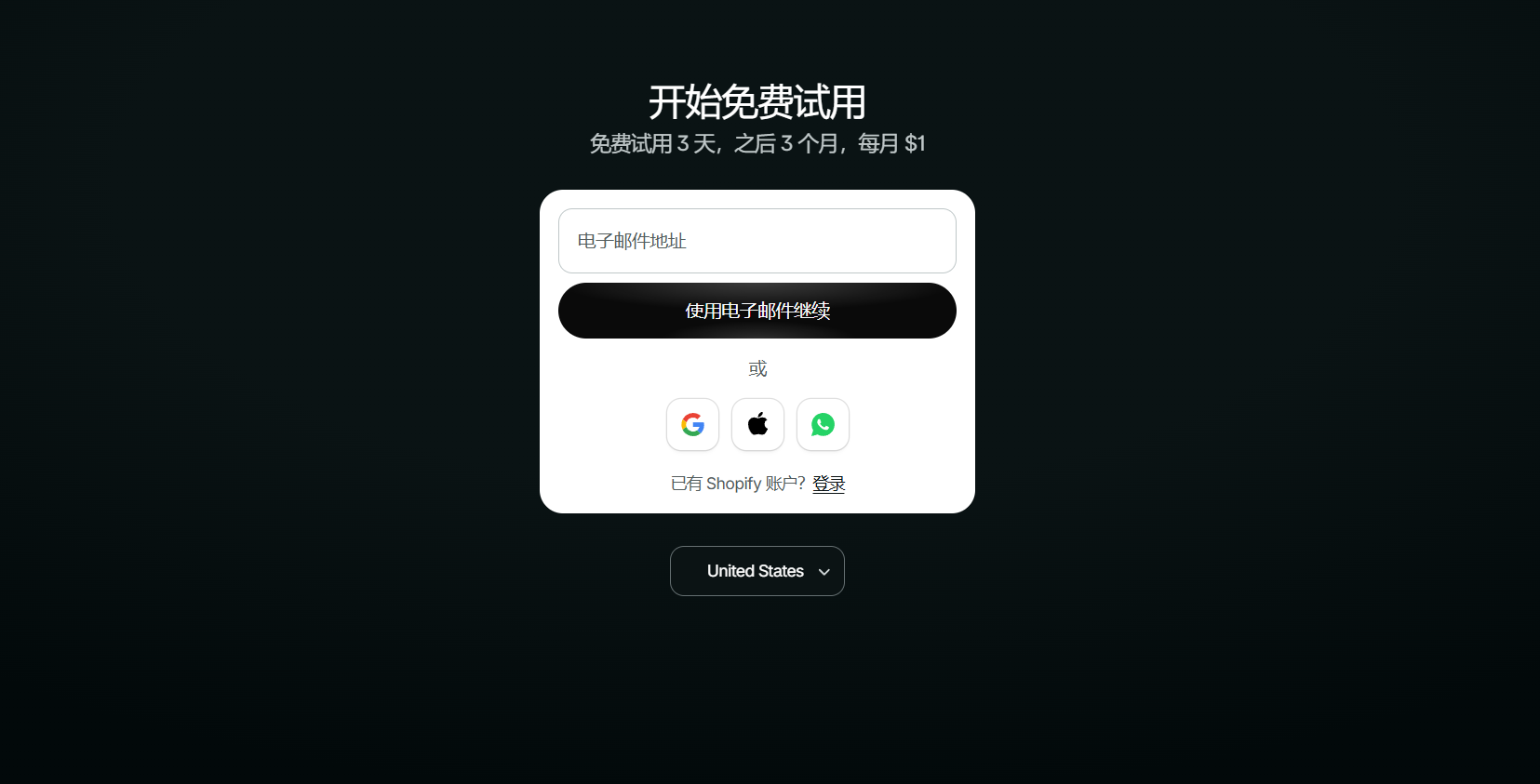
If an account qualifies for this offer, the promotional subscription fee across those 3 months totals $3—covering only the base store plan. Custom domains, paid apps, payment processing fees, product samples, ad spend, and fulfillment costs are all separate. Domain registration and renewal pricing should also be checked on the purchase screen.
Shopify's trial length and promotions vary by sign-up time, entry link, and region, and standard plan rates apply once the promotion ends (Official free trial & promotion details).
An email address lets you start registering, while paying subscription bills and passing Shopify Payments merchant verification are completely separate steps. Never assume that being able to pay for a store plan means you already qualify for payment processing or Capital financing.
5. Should New Stores Focus on Payments, AI Operations, or Financing First?
My recommendation: get transactions and fulfillment working end-to-end first, bring AI into daily operations next, and evaluate financing separately based on real operating numbers.
| Current Stage | What to Prioritize |
|---|---|
| Store not yet launched | Clarify what you sell and to whom; finish product, shipping, and after-sales info; confirm an eligible payment method |
| Launched and testing | Verify real checkout and fulfillment end-to-end, log customer questions, and use AI to review reports and organize tasks |
| Consistent operating history | Calculate product margins, refund rates, and cash conversion before deciding whether business financing makes sense |
Capital, Sidekick, and Payments can assist with cash flow, efficiency, and checkout collection respectively, but product demand, marketing effectiveness, and reliable fulfillment still have to be proven in real operations.
In spoken notes, I sometimes say "put 70% of your energy into product selection and 30% into marketing and operations"—that is a rule of thumb to keep focus on fundamentals, not a profit formula that works for every store. For an early-stage project, I start with three questions:
- Why do customers need this product, and why would they buy it from us?
- After subtracting COGS, shipping, payment fees, and customer acquisition cost, how much margin remains?
- Once a customer places an order, can our shipping and after-sales support deliver on what we promised?
AI can help gather research, summarize reviews, analyze reports, and update pages. Final decisions still come back to real customer demand and actual operating results.
About This Note & Sources
This article was compiled by Daming for the Simbatch website, combining real screenshots, practical takeaways, and official Shopify documentation. Screenshots reflect what those interfaces displayed at the time; official features and eligibility rules are governed by Shopify's latest documentation.
At Simbatch, we document operational issues, decision criteria, and outcomes so teams can reuse verified experience in future work. This guide will be updated when new documented records are added.
If you run a Shopify store and want help deciding whether to prioritize payment setup, storefront content, or analytics, share your operating region, product category, store stage, and the specific bottleneck when reaching out.
Explore Independent Store Operations · Request Store Operations Consultation · View Simbatch Case Studies
Sources
Documentation verified October 12, 2026; the three screenshots were provided by Daming and are interpreted in their respective captions.
- Shopify Capital: Eligibility, Regions, and Application Process
- US Shopify Capital: Loans and Repayments
- Sidekick: Features and Help Guidance
- Sidekick: Getting Started and Limitations
- Shopify Payments: Setup and Onboarding Requirements
- Shopify Payments: Payout Timing
- Shopify: Free Trial and Promotional Pricing
FAQ
Are Shopify Capital and Shopify Payments the same service?
No. Shopify Capital provides business financing to eligible merchants, whereas Shopify Payments handles customer checkout payments and payout management. Activating Shopify Payments does not automatically qualify a store for a Capital loan.
Does having sales guarantee a Shopify Capital offer?
Not necessarily. Sales volume is only one factor in the evaluation; eligibility, offer terms, and final approval depend on additional criteria. Always refer to official requirements and the current offers inside your admin.
Are the 17% and 12.6% numbers on the Capital page the same thing?
No. In the captured screenshot, 17% is the daily sales remittance rate, while 12.6% is the fixed borrowing fee relative to the requested amount. Neither figure should be read as an annual percentage rate (APR).
Can Sidekick replace a store operator?
No. Sidekick can assist with analysis and selected admin tasks, but an operator still has to validate metric definitions, verify content accuracy, and make product and budget decisions.
Do orders attributed to ChatGPT prove that AI search optimization is already working?
Not by itself. A referral report shows visits and orders under a specific tracking scope; you still need to verify date ranges, landing pages, underlying order records, and actual AI citations before drawing conclusions about content performance.