
I am Daming at Simbatch. While reviewing payment settings for our US Shopify store, I saw PayPal Wallet listed under Shopify Payments payment methods. On the Payouts transactions screen, two PayPal orders (#1604 and #1602) appeared in the same Pending table alongside Visa and Mastercard transactions.
For eligible US Shopify Payments merchants, PayPal Wallet is integrated directly into Shopify Payments. A wallet account is provisioned automatically when setting up US Shopify Payments—without registering or linking a separate standalone PayPal Business account—and funds settle through Shopify Payments to your configured payout account (in our store, Shopify Balance *3702).
PayPal Wallet vs. PayPal Express Checkout
Although buyers pay with PayPal in both cases, the backend integration and settlement paths differ:
- PayPal Wallet (US Shopify Payments): Automatically provisioned during US Shopify Payments setup; settles via Shopify Payments to your payout account (*3702); fees, refunds, and disputes are managed inside Shopify Admin.
- Standalone PayPal Express Checkout: Legacy/separate integration; settles to an independent PayPal account; legacy Express disputes remain in PayPal Business Center.
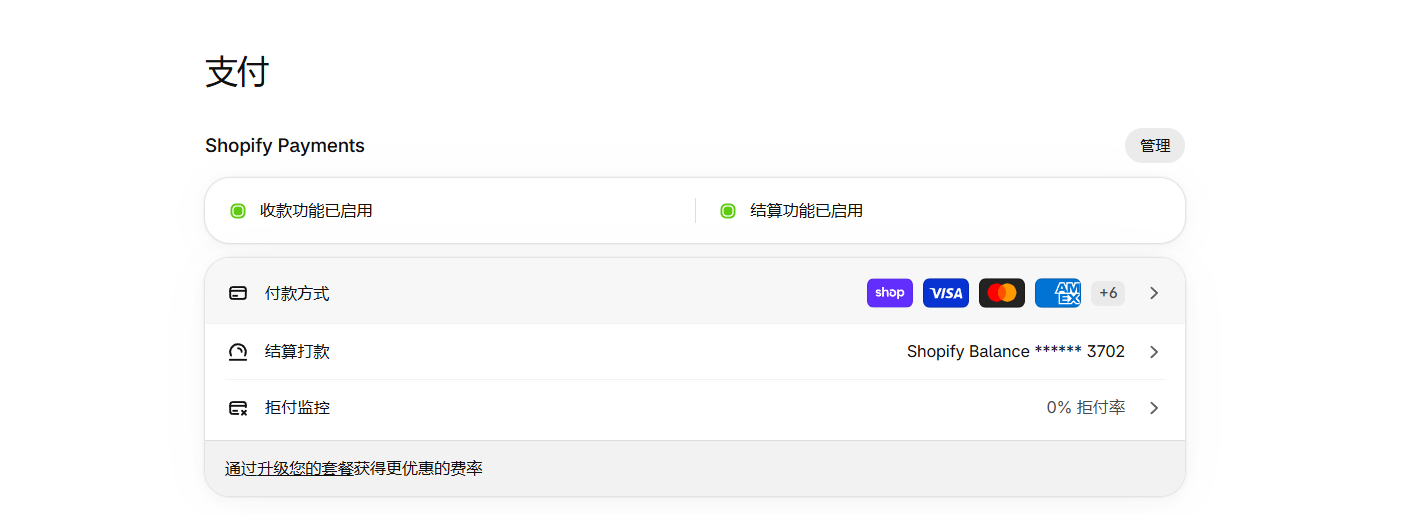
Step 1: Verify Shopify Payments & Payout Account
In Settings → Payments, both Payments and Payouts show active green status, and the payout account points to Shopify Balance (*3702) with a 0% chargeback rate at the time of capture.
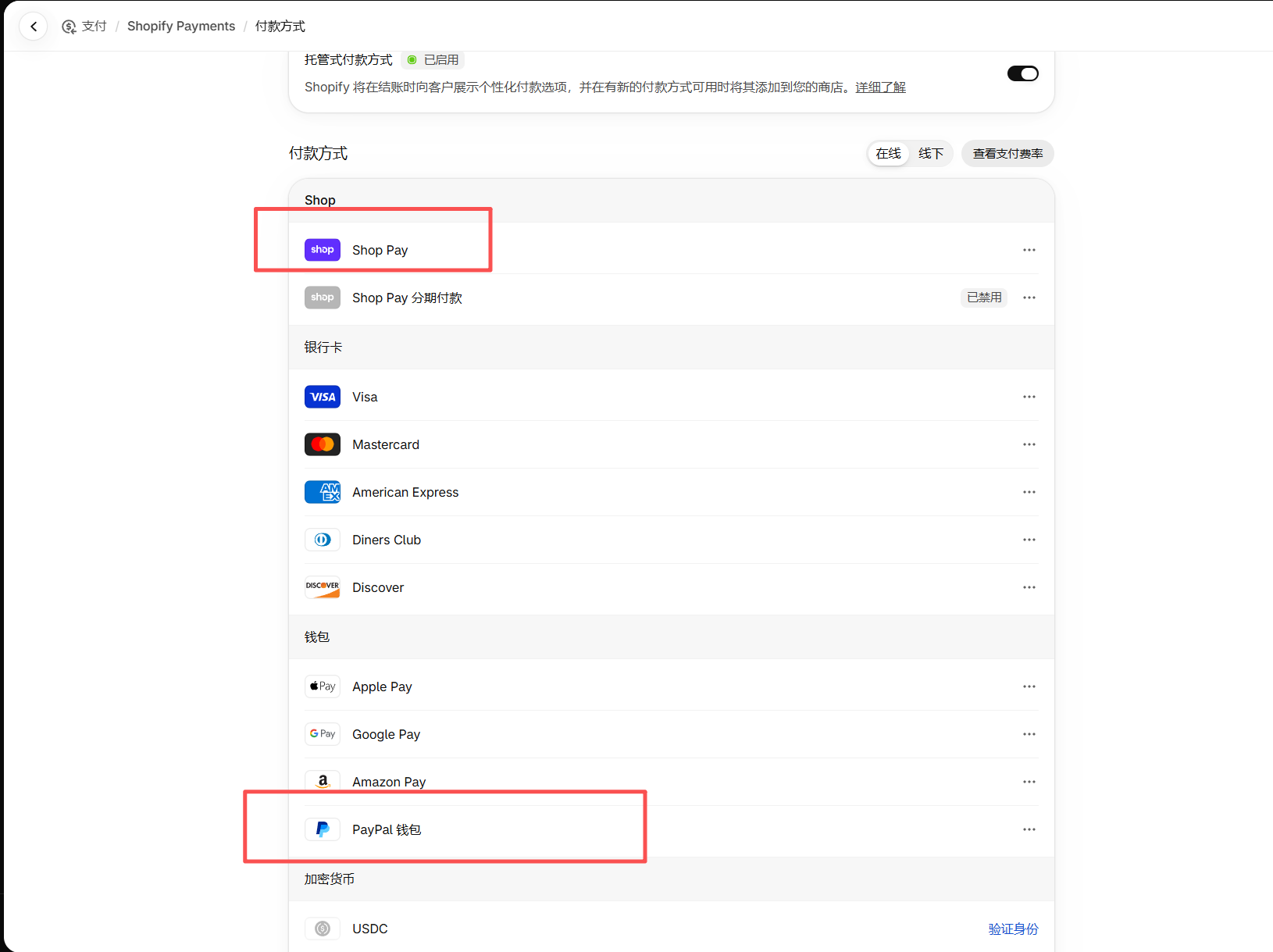
Step 2: Confirm PayPal Wallet Under Payment Methods
Navigating to Payments → Shopify Payments → Payment methods, the Wallets group explicitly lists PayPal Wallet alongside Shop Pay.
Step 3: Check Two PayPal Orders (#1604 & #1602) & Net Amounts
In the Pending transactions table (total pending $9,446.04 across card and wallet orders), our two Nov 8 PayPal orders are:
- Order #1604 (2026-11-08): Gross
$43.83− Fee$2.02= Net$41.81(scheduled payout date:2026-11-14) - Order #1602 (2026-11-08): Gross
$32.88− Fee$2.13= Net$30.75(scheduled payout date:2026-11-14) - Combined: Gross
$76.71− Fees$4.15= Net$72.56
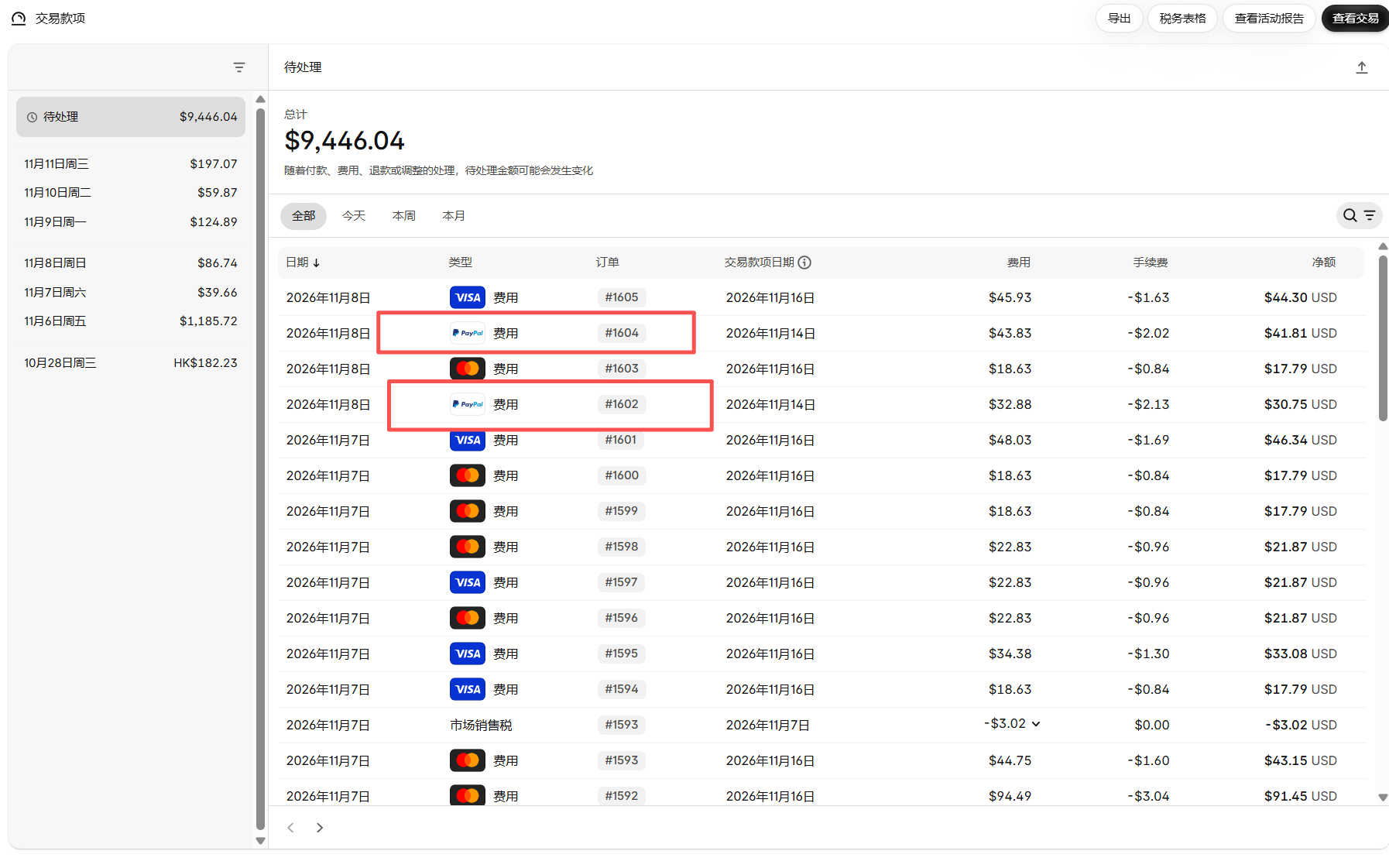
Step 4: Separate Scheduled Date from Actual Payout Arrival
Both PayPal orders list 2026-11-14 as the scheduled payout date (6 calendar days from Nov 8), while adjacent Visa/Mastercard orders list 2026-11-16. Only mark a transaction as settled after matching the payout batch to an actual credit in Shopify Balance (*3702) or your bank statement.
Step 5: Manage Fees, Refunds & Disputes in Shopify Admin
For PayPal Wallet orders, fee breakdowns, refunds, and disputes are managed directly in Shopify Admin. Legacy standalone PayPal Express orders still require PayPal Business Center for dispute handling.
FAQ
Do US stores need to register a separate PayPal Business account for PayPal Wallet?
No. Eligible US Shopify Payments merchants receive a PayPal Wallet account automatically during setup.
Where do PayPal Wallet payouts go?
They settle through Shopify Payments into your configured payout account (in our case, Shopify Balance ending in 3702).