
Summary: Step-by-step guide to Meta's early November 2026 pilot Alipay legal representative facial verification for Chinese advertisers, covering OE onboarding, restricted accounts, ID rules, and sole proprietors.
Overview: Two Verification Entry Paths
Note: The cover image is an editorial graphic; all workflow screenshots below are taken from the referenced onboarding and appeals materials.
When a Meta ad account triggers Alipay legal representative verification, teams should first confirm the corresponding business entity, enter the true details of the legal representative named on the business license, and have that person scan the QR code with Alipay to complete facial recognition. New OE (Onboarding Efficiency) applications enter from the onboarding flow, while existing restricted accounts enter from the notification inside Ads Manager or email. Once identity verification finishes, teams still need to check final submission or restriction-removal status.
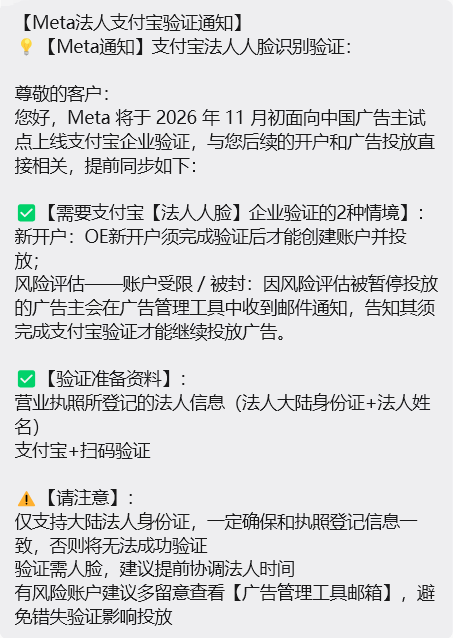
According to an agency-forwarded pilot notice, Meta scheduled an early November 2026 pilot rollout of Alipay corporate legal representative verification for Chinese advertisers.[4] Combining that notice with two October 2026 user guides and direct agency confirmation, this guide separates the OE new-account flow from the risk-triggered re-verification flow for existing ad accounts.
| Scenario | Where to Start | What to Check Afterward |
|---|---|---|
| OE New Account Opening | Verification step inside the OE onboarding application | Identity verification result and remaining review/submit steps |
| Existing Account Notified | Ads Manager restriction alert or notification entry | Identity verification result and whether account restrictions are lifted |
Scope note: This article documents the flow shown in the October 2026 guides and pilot notice; not every account displays identical screens. Whether verification is required, which entry appears, and subsequent review steps depend on each live account's notifications. Screenshots are workflow examples from the source materials and do not imply Simbatch has live-tested every account tier.
1. Reviewing the Pilot Notice Received from the Agency
The agency-forwarded notice specifies both "early November 2026" and "pilot" scope, covering two triggers: new OE account openings and existing accounts restricted after risk evaluation. Seeing this notice ahead of time helps media-buying teams prepare documentation before Facebook ad delivery gets interrupted.
2. Preparing Documents and Personnel Before Starting
In both guides, "legal representative verification" specifically means verifying the identity of the legal representative listed on the business license used to open the ad account:
- The business license used for account opening, together with the matching Business Manager (BM) details.
- The full name and ID number of the legal representative listed on that business license—both guides note that only mainland China Resident ID cards are accepted in this flow.
- The legal representative in person with an active Alipay mobile app ready to scan the on-screen QR code and complete facial recognition.
Confirm that the "opening entity — business license — legal representative details" match before entering any form fields. Keep ID numbers and live verification QR codes inside the actual verification screen rather than pasting them into public group chats or training screenshots.
3. Entering Verification During New Account Onboarding (OE)
OE stands for Meta's Onboarding Efficiency tool. The October 2026 advertiser guide lists the onboarding sequence as: enter company info and website domain, Facebook account name, Facebook Page, Verification, and Review & Submit.
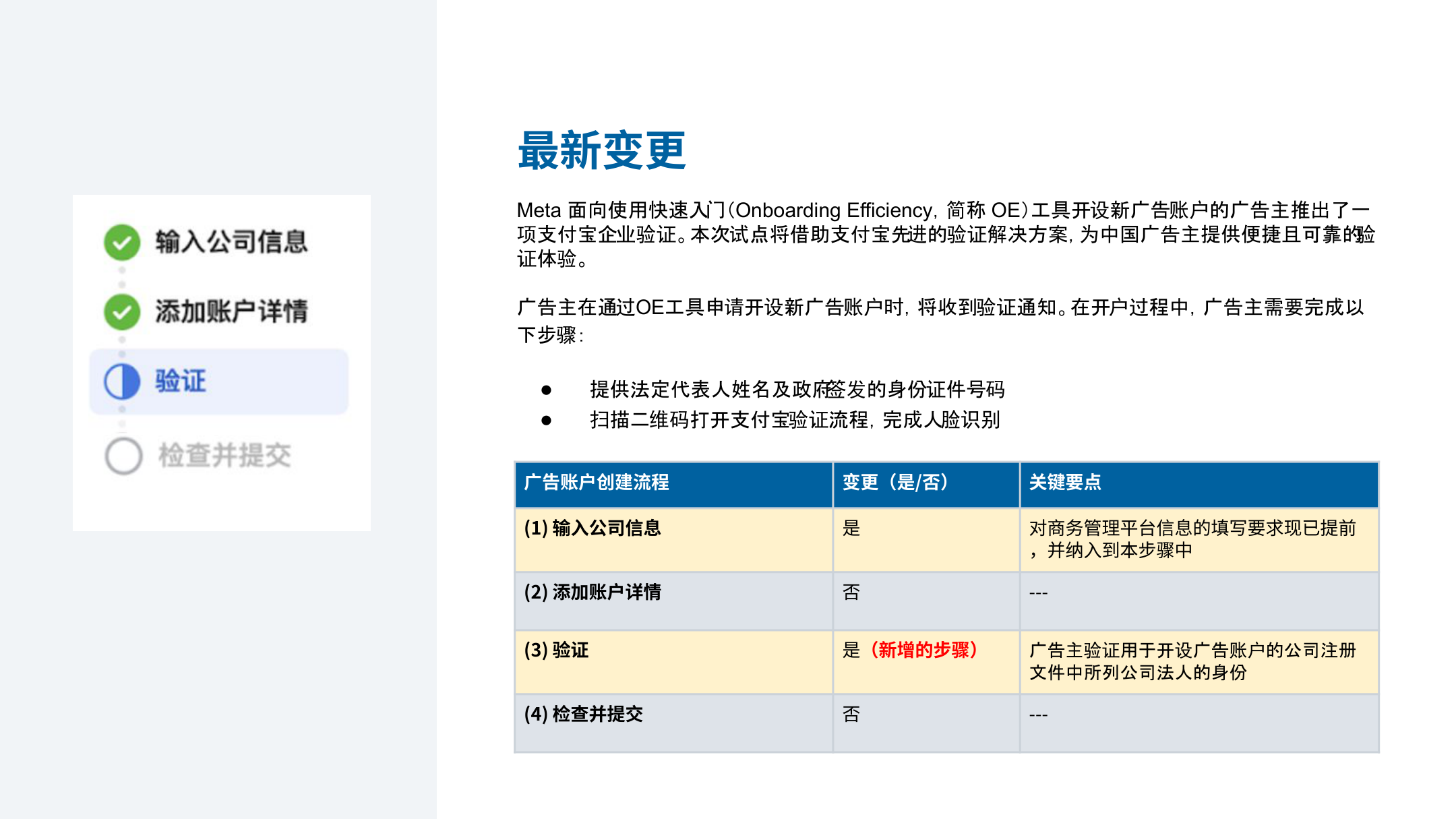
Before starting OE onboarding, prepare the Facebook personal profile, Facebook Page, and Business Manager (BM) to be used. Although BM details can be edited later, aligning BM entity information with the business license from day one makes future appeals much cleaner if either the BM or ad account enters review. At the QR step, the legal representative simply scans using their real-name verified personal Alipay account.
4. Filling Legal Representative Details and Scanning the Alipay QR Code
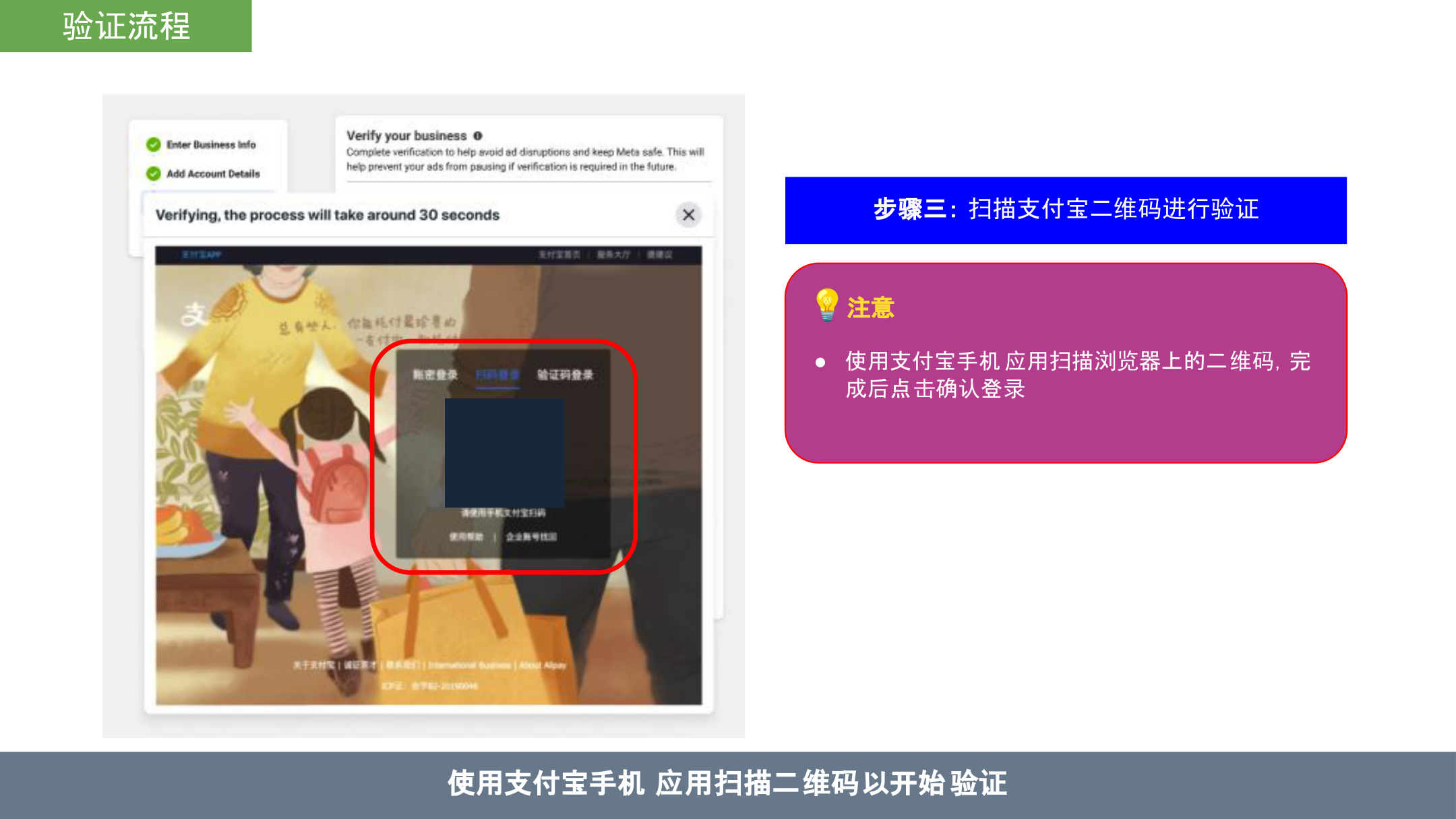
At the verification step, enter the legal representative's name and ID number exactly as shown on the business license. The guide explicitly indicates that the legal representative scans with their personal Alipay account rather than requiring a corporate Alipay wallet.
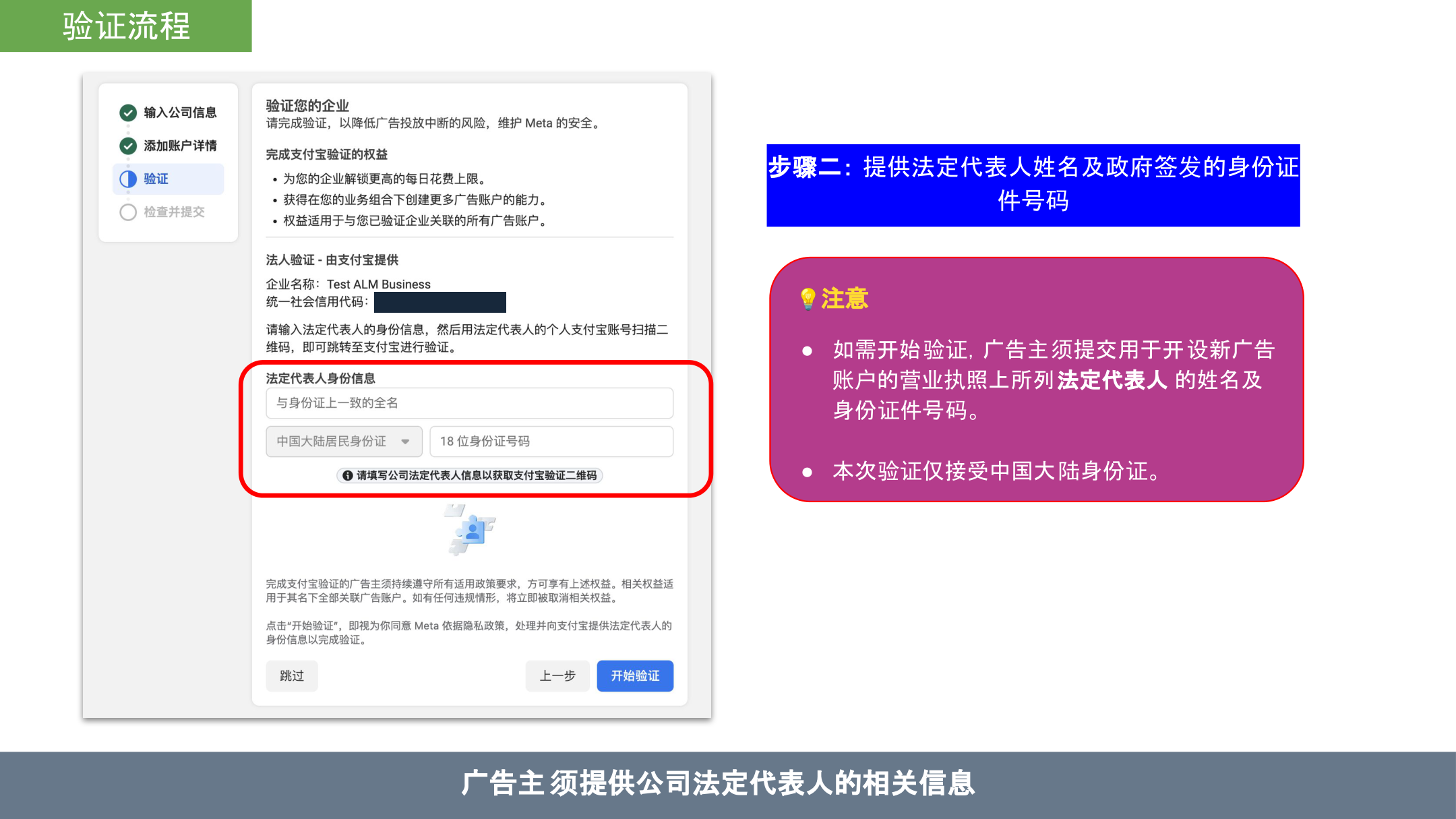
On desktop, scan the verification QR code with the Alipay app, confirm login, and complete facial recognition. Afterward, return to the OE page to inspect the result and continue to Review & Submit.[1, pp. 5–6]
5. Handling Verification Notices on Existing Restricted Accounts
The second October 2026 guide covers re-verification triggered after risk evaluation. Advertisers required to complete this check receive alerts inside Ads Manager as well as via email, meaning active or older ad accounts can also encounter the new verification requirement.[2, pp. 2–3]
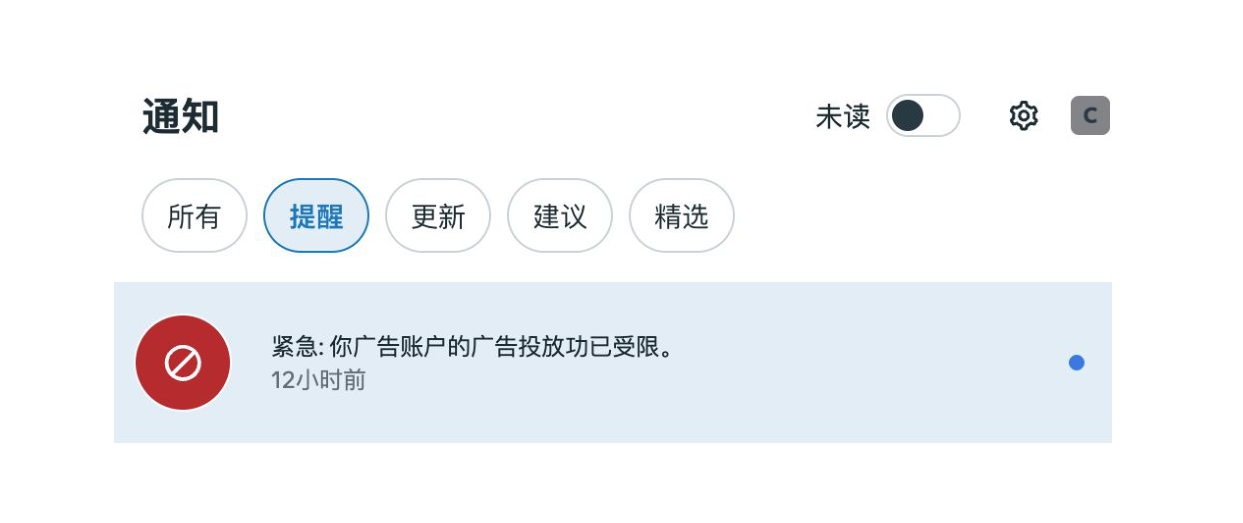
Upon seeing the alert, log in to Ads Manager to confirm the affected ad account and restriction notice, then open the re-verification entry shown on the page.
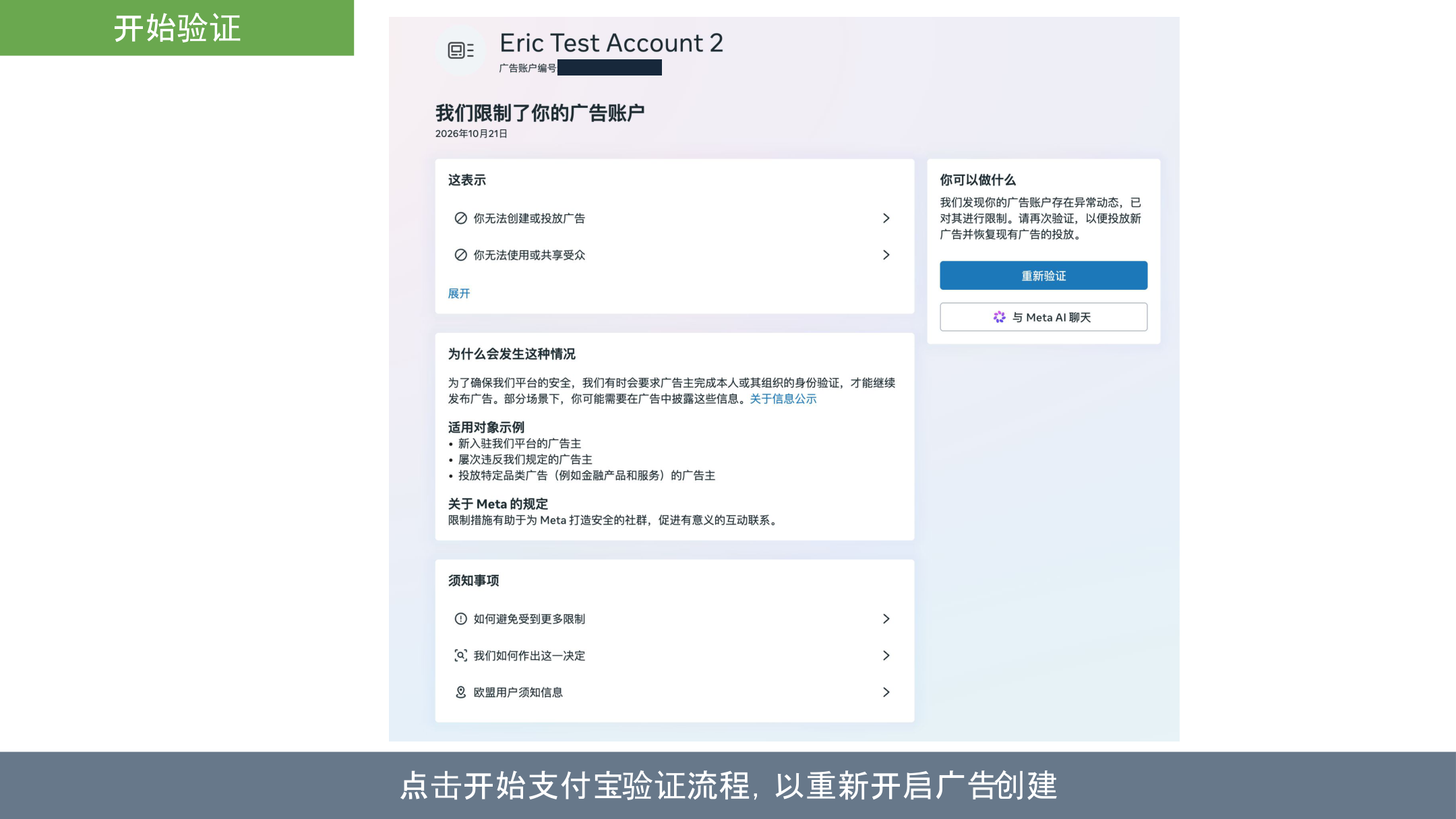
Next, submit the legal representative's details matching the business license and complete the Alipay QR scan and facial recognition. Both paths require matching the authentic entity—teams must not substitute another person's ID simply because an account was restricted.[2, pp. 5–6]
6. Checking Account Status After Verification Completes
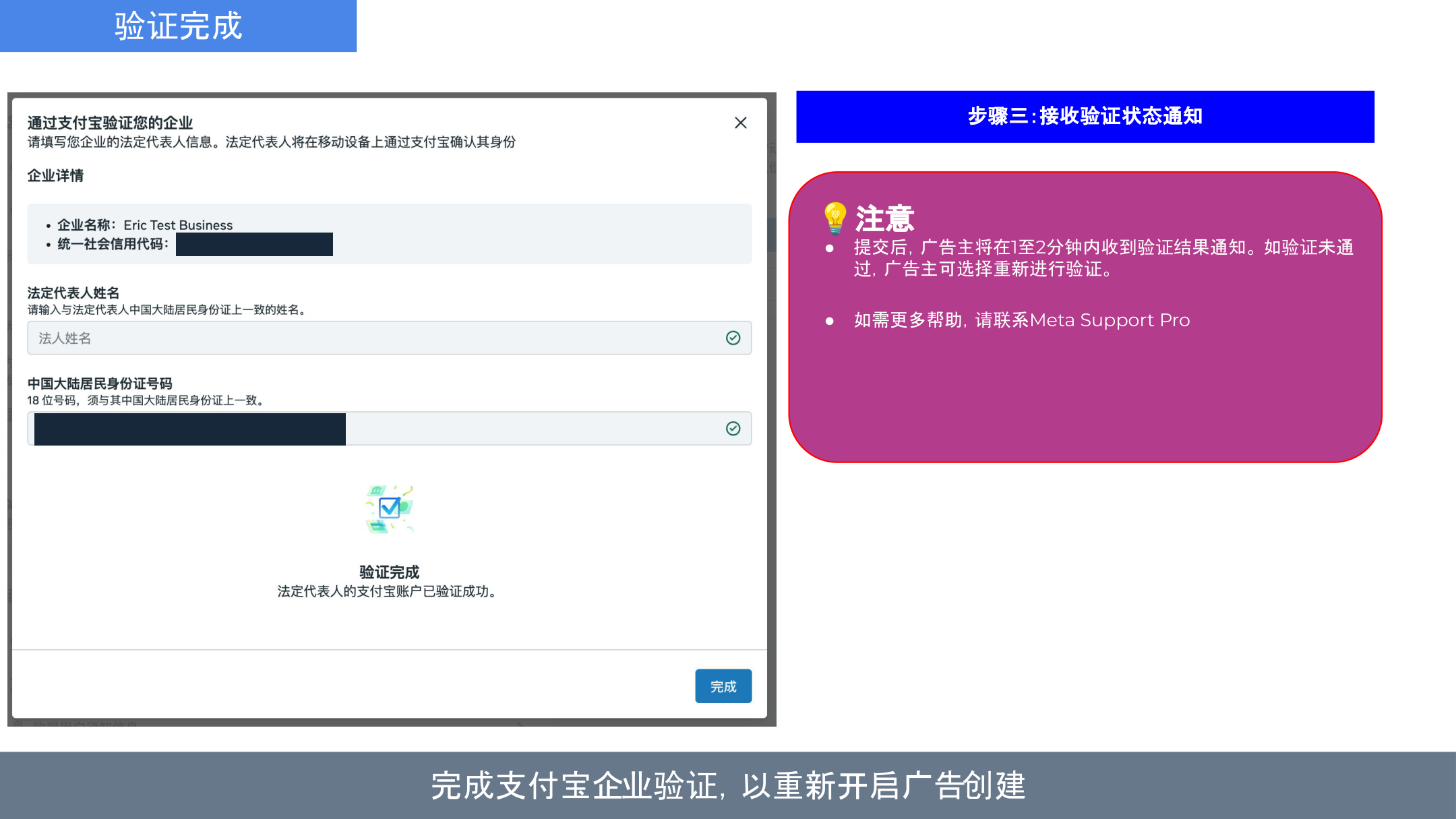
Both guides note that verification results typically arrive within about 1–2 minutes after submission; if verification fails, advertisers can retry or contact Meta Support Pro.[1, p. 6; 2, p. 7]
Keep in mind that 1–2 minutes refers strictly to the identity-verification response, not a universal turnaround time for full account approval, appeal review, or ad resumption. After seeing "Verification Completed," new OE applicants must finish reviewing and submitting the application, while restricted accounts still need to confirm that existing restrictions have cleared and no other pending tasks remain.
7. Troubleshooting Checklist When Verification Fails
- Check entity alignment: confirm which business license and ad account the verification prompt belongs to and make sure there is no mismatch.
- Check personal details: verify that the name and 18-digit ID number are exact and match the ID type supported by the verification portal.
- Confirm in-person scan: verify that the legal representative personally completed the scan and facial recognition and that the QR code has not expired.
- Capture error logs: record the exact error message and timestamp, mask sensitive ID numbers, and escalate to your agency or Meta Support Pro.
8. Can an Individual Business License (Sole Proprietor) Open an Account?
During our agency check-in, we explicitly asked: "Can an individual business license (sole proprietorship) also be used to open an account?" The agency confirmed: "Yes, it can." This direct reply provides a practical reference when planning multi-store account structures—for operators managing multiple brand storefronts, individual business licenses can serve as an option alongside registered corporate entities where supported.[3]

9. What Cross-Border Teams Should Prepare in Advance
For cross-border media teams, scheduling people ahead of time is far more effective than scrambling after an alert hits. Before applying for a new account, verify business entity, BM, and ID records and coordinate a window when the legal representative can scan personally. In day-to-day operations, assign a clear owner to monitor Ads Manager alerts and account emails.
We compiled this guide to clarify who needs to act, what documents are needed, and where each path begins: follow OE for new accounts, follow the live notice for existing accounts, and always verify final account status directly on screen.
Sources & Image Credits
- [1] 26.10 OE Legal Representative Verification - Advertiser Guide (CN).pdf, internal title "Quick Start: Alipay Verification Flow", October 2026, 6 pages.
- [2] 26 Risk Assessment Alipay Legal Representative Verification - User Guide (CN).pdf, internal title "Alipay Verification in Appeals Flow", October 2026, 7 pages.
- [3] Agency communication screenshot provided during review; confirmation applies to that specific inquiry and live eligibility must still be checked before submission.
- [4] Agency-forwarded Meta Alipay Legal Representative Verification Notice chat screenshot; early November 2026 reflects the pilot window stated in that notice, subject to live account prompts.
Figures 2–7 are unretouched screenshots or partial crops from the PDF guides above, with only sample personal, corporate, ad-account IDs, and QR codes masked. Figures 1 and 8 are excerpts from the notice and agency chat. The cover is an editorial graphic. Compiled by Simbatch from provided materials; this guide is not an official Meta or Alipay announcement.
FAQ
Do all Chinese Facebook (Meta) ad accounts have to complete Alipay legal representative verification?
No blanket rule applies to every existing account. According to the early November 2026 pilot notice, new accounts opened via OE must complete Alipay legal representative facial verification, while active or paused legacy accounts should follow actual notifications received inside Ads Manager or by email.
What documents and details are required for Meta Alipay legal representative verification?
Prepare the business license used to open the ad account, the matching Business Manager (BM) details, and the full name plus 18-digit mainland China Resident ID number of the legal representative named on that license, who must personally scan the QR code using the Alipay app to complete facial recognition.
Can a media buyer or agency complete the Alipay facial verification on behalf of the legal representative?
No. The documented flow requires the legal representative listed on the business license to personally complete identity verification and facial recognition; media buyers, BM admins, or agencies cannot substitute their own identity or face.
Is a corporate Alipay account required before completing Meta Alipay verification?
No. The OE onboarding guide explicitly shows scanning with the legal representative's personal Alipay account and does not require opening a separate corporate Alipay account, though users should always follow the specific prompt on their live verification screen.
How long after completing Alipay verification will an account resume running ads?
The guides state that identity verification results typically return within 1–2 minutes, which applies only to the identity check itself—not full ad restoration. New OE accounts must still complete review and submission, and restricted accounts must verify that restrictions have cleared and no other pending actions remain.
Can an individual business license (sole proprietor) be used to open a Meta ad account and pass verification?
Per agency confirmation, individual business licenses can be used alongside corporate licenses to open accounts; before applying, confirm product eligibility and ensure the operator/legal representative ID matches the license registration exactly.