
Summary: Our outdoor store's Shopify Payments was disabled over a Mastercard UK compliance notice. We removed flagged items, disabled UK shipping, and replied across two rounds until reactivated.
First, Confirm What Was Actually Restricted After Seeing the Admin Alert
In this incident, Shopify Payments was disabled on one of our outdoor standalone stores. Following the platform's notices, we handled the flagged products, updated UK shipping settings, and followed up by email. Eventually, Shopify confirmed the account was active and running, and the admin showed both payment acceptance and payouts enabled again.
I documented the nine real screenshots from this case to explain what happened, how we responded, and how we verified the outcome. If you encounter a disabled Shopify Payments account or paused payouts, you can use this troubleshooting sequence alongside the exact notices in your own inbox.
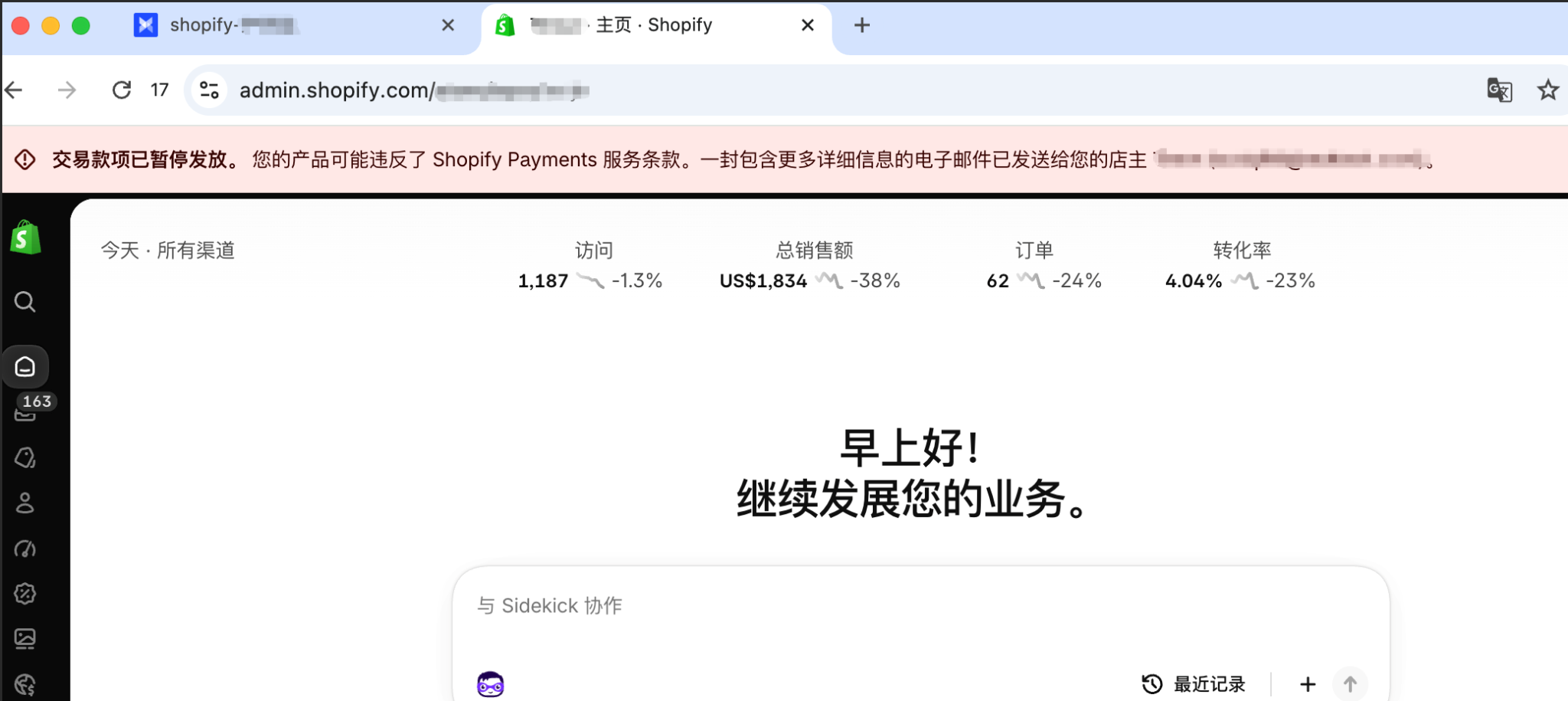
In the admin, two separate notices needed to be read together. First, the top banner on the Home screen stated that payouts were on hold because products might violate Shopify Payments Terms of Service, with details sent to the store owner's email.
Second, the notification center was even more direct: the Shopify Payments account had been disabled, could no longer accept payments, and prompted us to configure another payment provider.
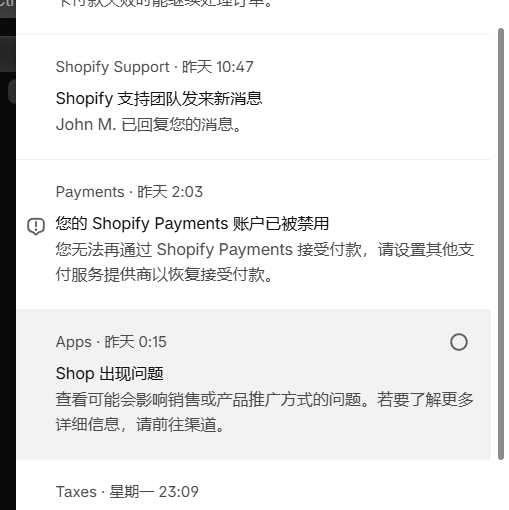
That made the scope clear: we had to address both the held payouts and the disabled gateway. Customers could no longer pay, the Shop checkout button disappeared from the storefront, and card acceptance stopped, though payouts were paused rather than permanently forfeited.
Find the Full Email to Know Exactly What Shopify Requires
We also had a Shopify Trust & Safety admin notice dated October 21 reminding us that important information had been sent to the account owner's email and required action.
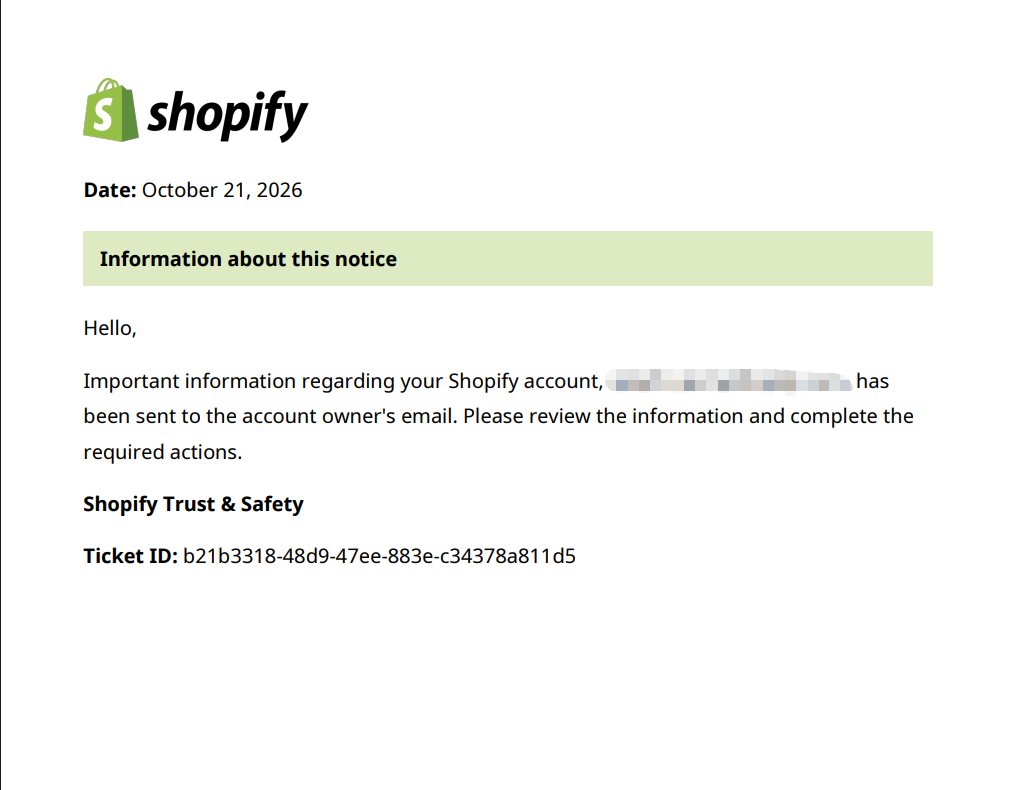
Whenever I see an alert like this, I pull together every related email in the thread to verify the timeline. Note the dates here: the reminder in Figure 3 is dated October 21, while the underlying issue email in this screenshot set was dated earlier on October 9.
In the October 9 email, Shopify explained that it had received a notice from Mastercard regarding a potential fine. According to the translated email text shown in the screenshot, the issue involved selling items to the UK that Mastercard classified as bladed weapons, requiring the listed products to be removed within two days. Those items were outdoor products rather than actual weapons—we would never sell weapons—but Mastercard's acquiring rules have tightened significantly, especially for shipments to the UK, so any flagged catalog item in that market needs immediate correction.
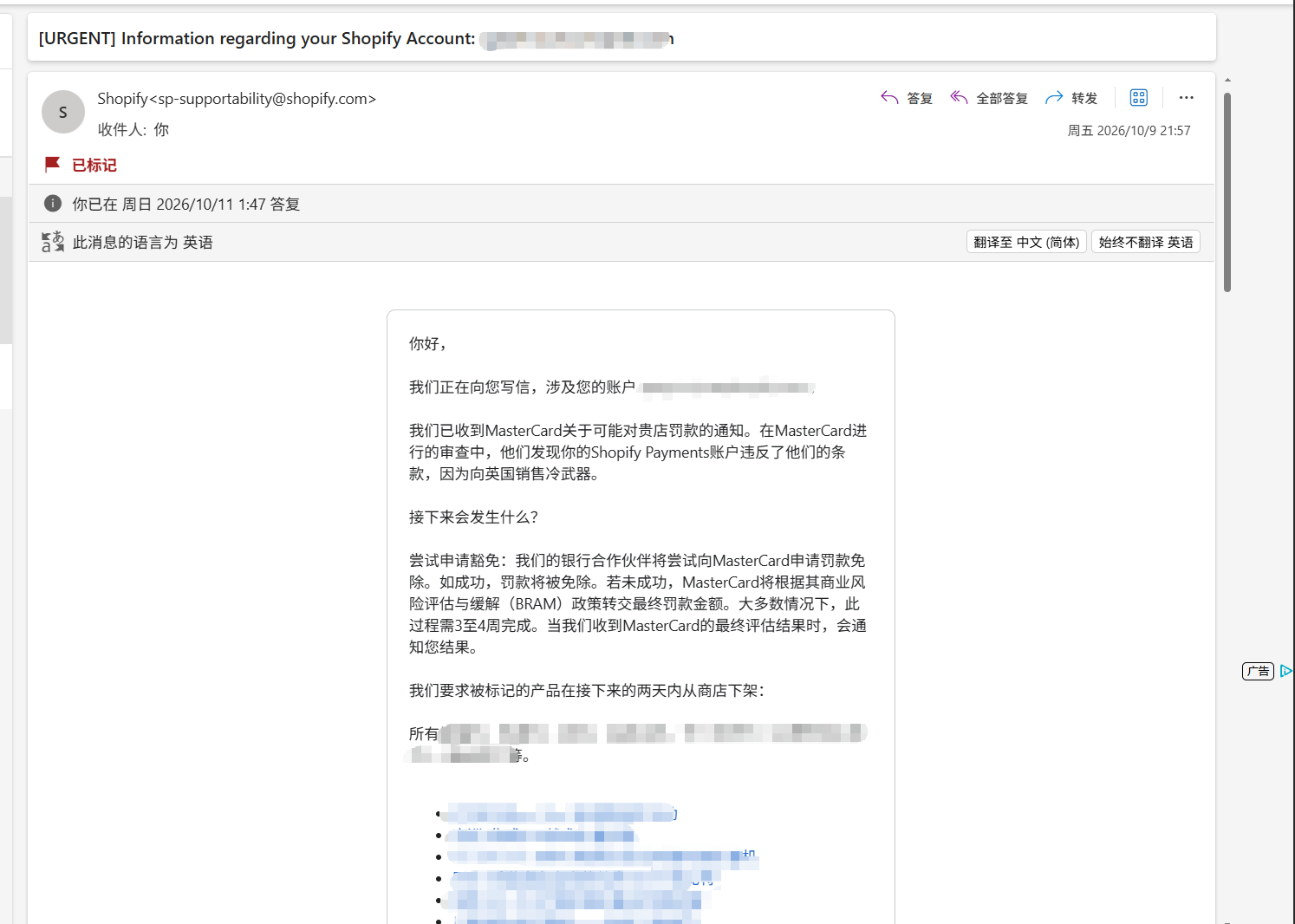
Once we read that email, the remediation path was clear: audit the listed products and inspect the store's shipping destinations. The email also noted that the banking partner would attempt to apply for a fine waiver—that is a separate matter awaiting its own outcome. Because the later reactivation email did not state a final decision on the fine waiver, I will not conflate the two and claim everything is settled.
Round 1: Handle Flagged Products and Reply Clearly With Completed Actions
On October 11, we replied by email detailing our remediation steps:
- The listed products and similar items had been taken off sale;
- Shipping settings had been adjusted to block shipments to the UK;
- We asked Shopify to confirm whether these actions met their requirements;
- We also asked about the Shopify Payments account status and how held payouts would be handled.
Our reply attached a screenshot showing the flagged products switched to Draft (and deleted/unlisted without hesitation). Because the email specifically listed the disputed products and this was a long-running store with stable payment history, we removed them immediately to give account recovery the best chance.
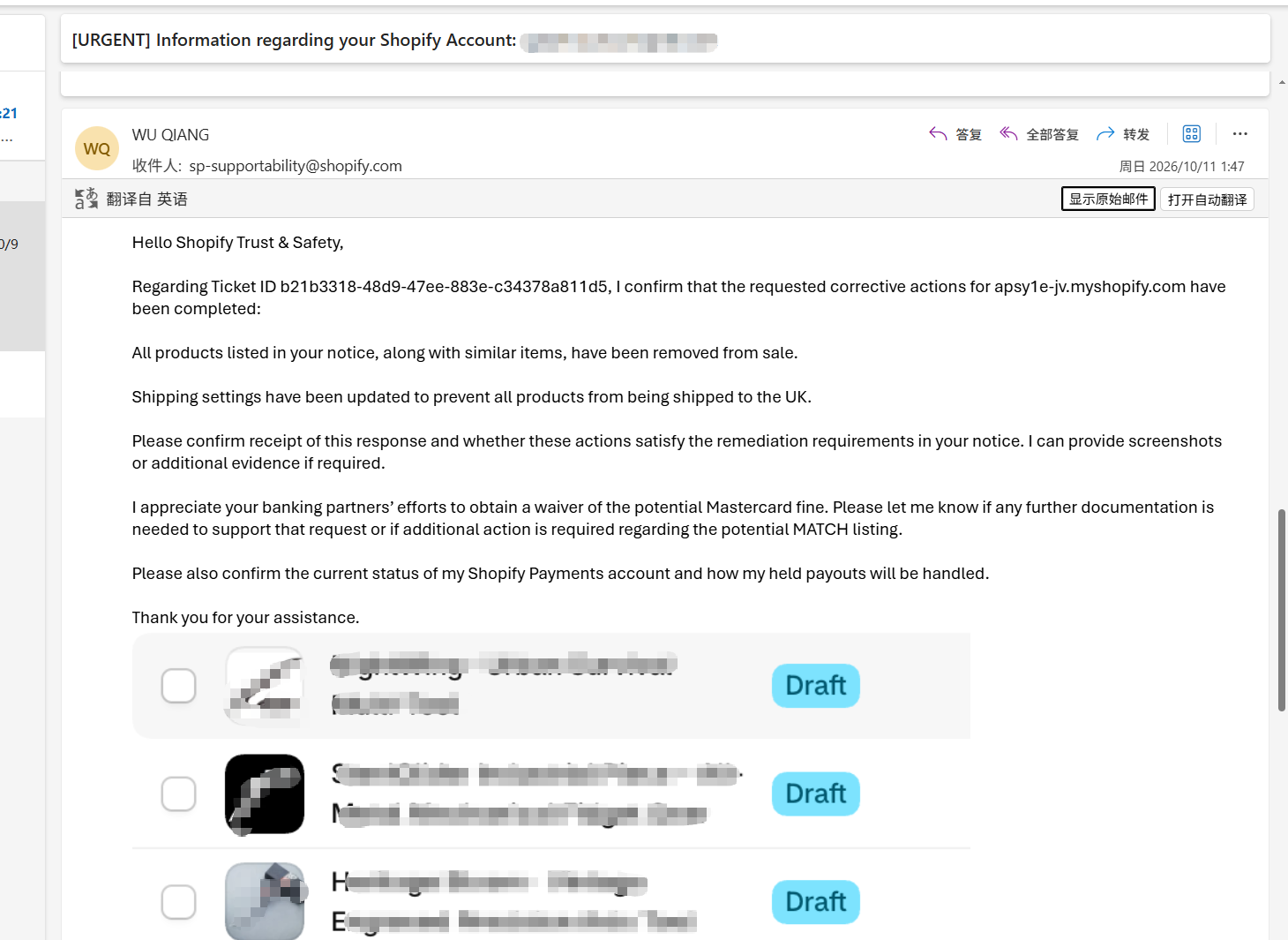
In replies like this, the most important part is stating clearly: what concrete actions you have completed, and what confirmation you need next. Simply writing "please restore my account" is not enough—combining the product changes, shipping changes, and screenshots in one email makes verification much easier for the reviewer. Still, sending that first reply did not end the case; you have to keep watching the thread.
Round 2: Platform Again Required Removing UK Shipping Destinations
In its follow-up reply, Shopify stated explicitly that shipping settings still needed adjustment: the United Kingdom had to be removed as a shipping destination, and we needed to notify them afterward so they could re-review the account for eligibility.
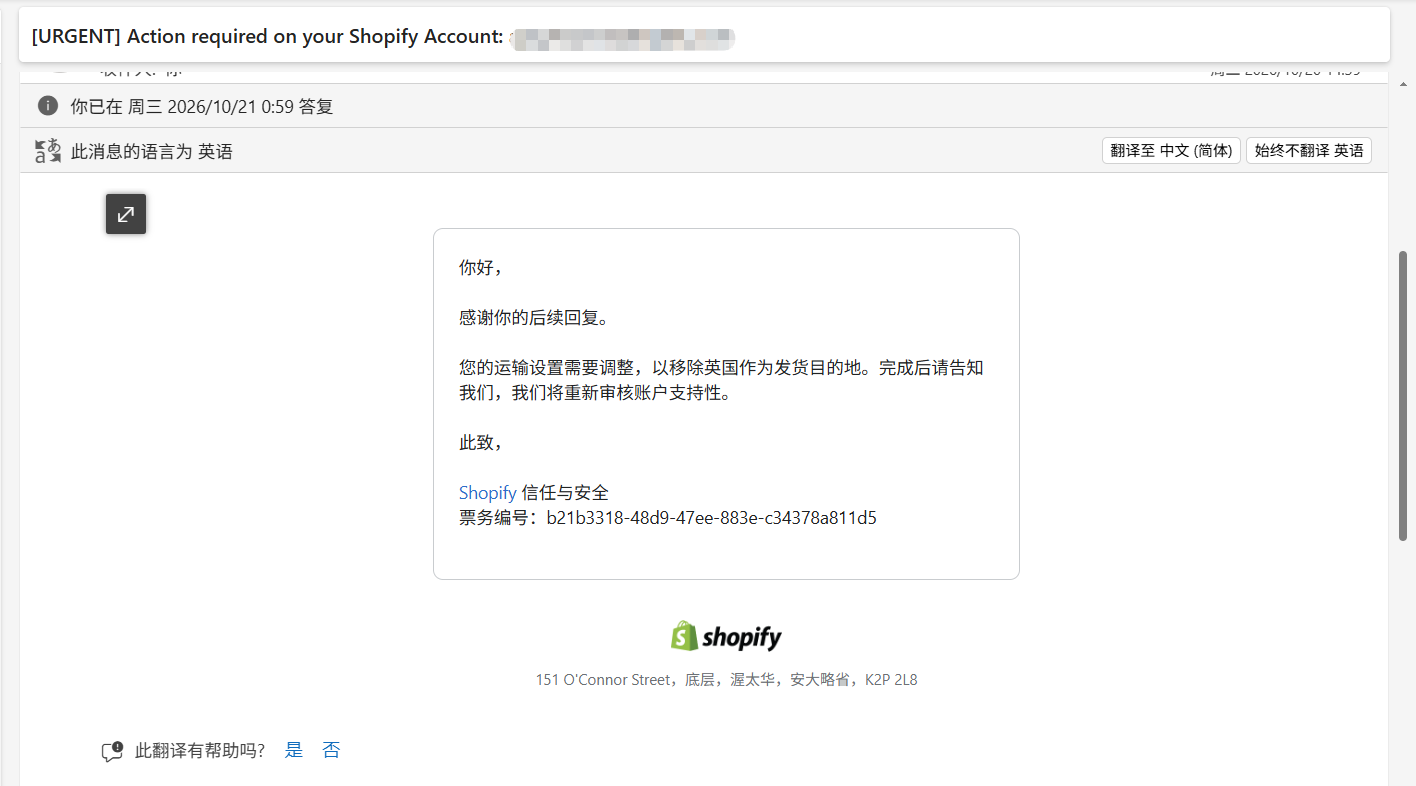
This is a detail I specifically wanted to preserve. Even though our Round 1 email stated shipping had been adjusted, the platform still flagged UK shipping afterward. From the screenshots alone, I cannot determine which exact sub-setting had been missed, and I will not fabricate a guess—what matters is following the explicit instruction and sending visual proof of the final state.
If you receive a similar requirement in the classic shipping interface, go to Settings → Shipping and delivery in your Shopify admin, open the relevant shipping profile, open the menu next to the shipping zone, choose Edit zone, update the countries, and save (some stores are gradually migrating to Market-based shipping management, so follow your actual admin layout). Check every shipping profile if your store uses more than one.
In our follow-up reply, we confirmed that shipping to the UK was disabled and the United Kingdom had been removed from the store's shipping settings, and asked for a re-review.
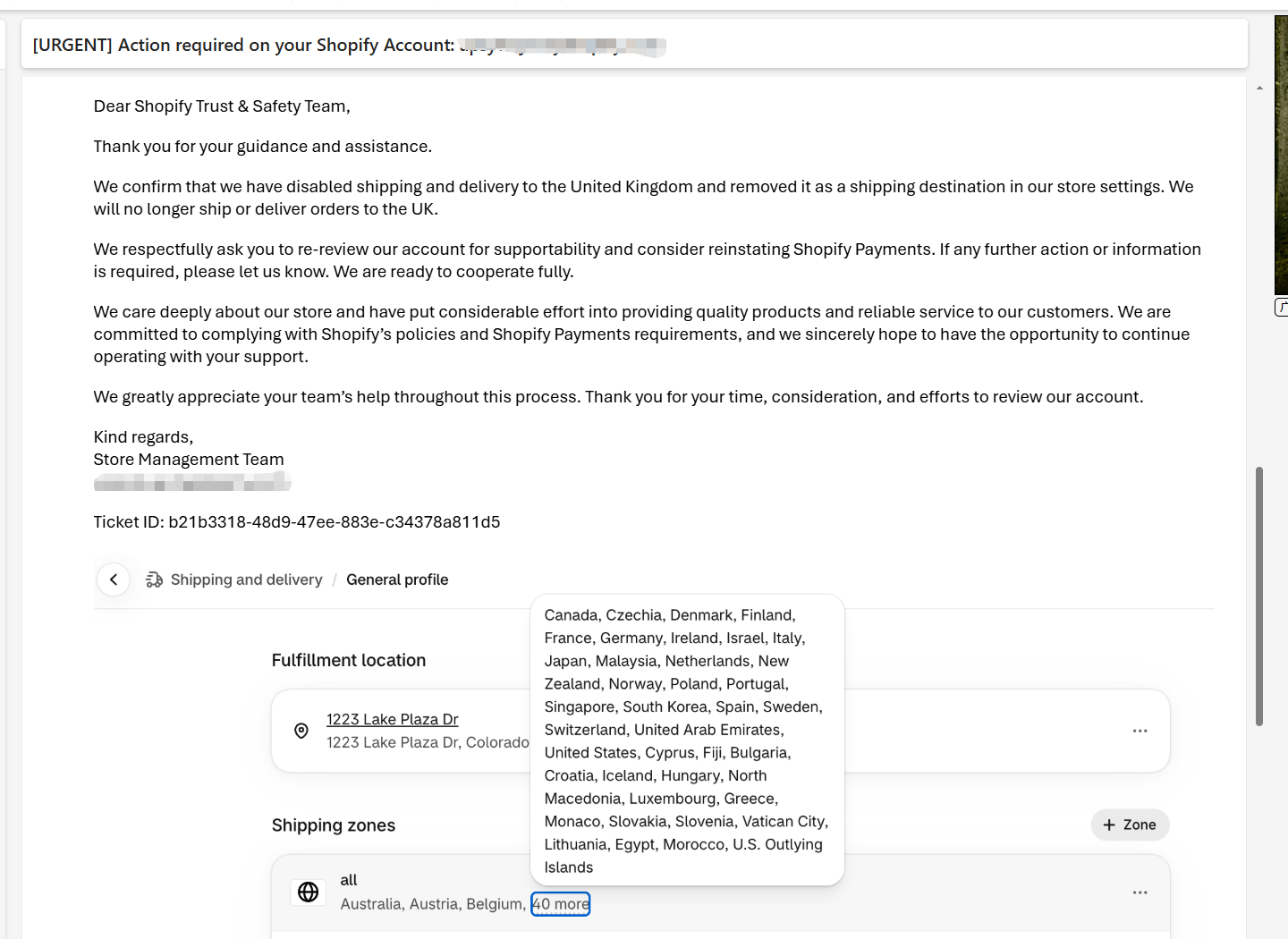
Figure 7 clearly shows Shipping and delivery, the General profile, and the updated country list. Attaching that screenshot let the reviewer inspect the live configuration directly. Removing UK shipping was specific to this notice—other stores should always inspect their own compliance email rather than copying this country change blindly.
How We Confirmed Recovery: Both Platform Email and Admin Status
Subsequently, Shopify Trust & Safety sent a clear confirmation:
"Your Shopify Payments account is active and running at this time."
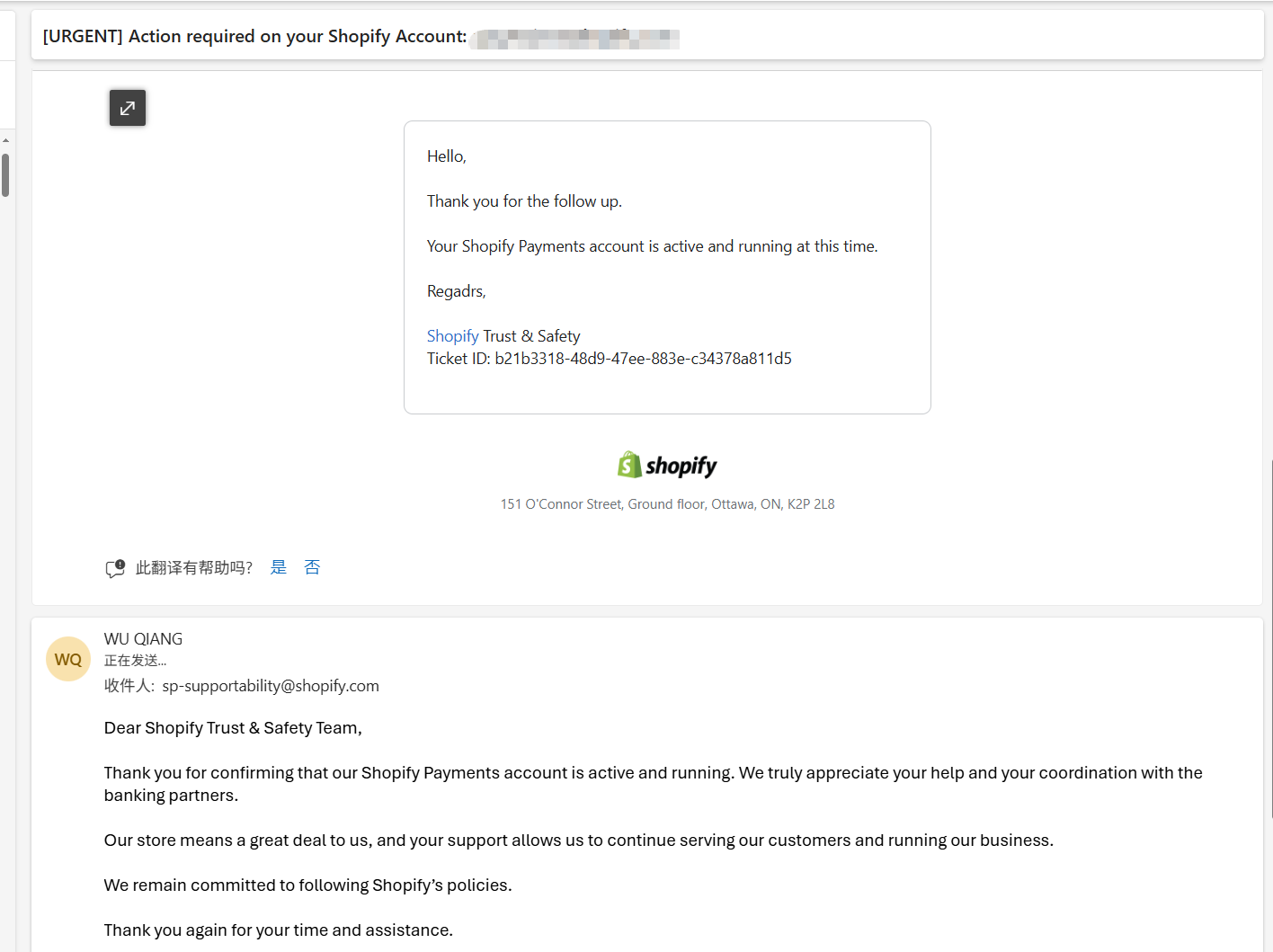
After receiving that email, we went back into the Shopify admin to cross-check. The notification center showed that the Shopify Payments account was active, and the Payments settings page displayed green active indicators for both payment acceptance and payouts.
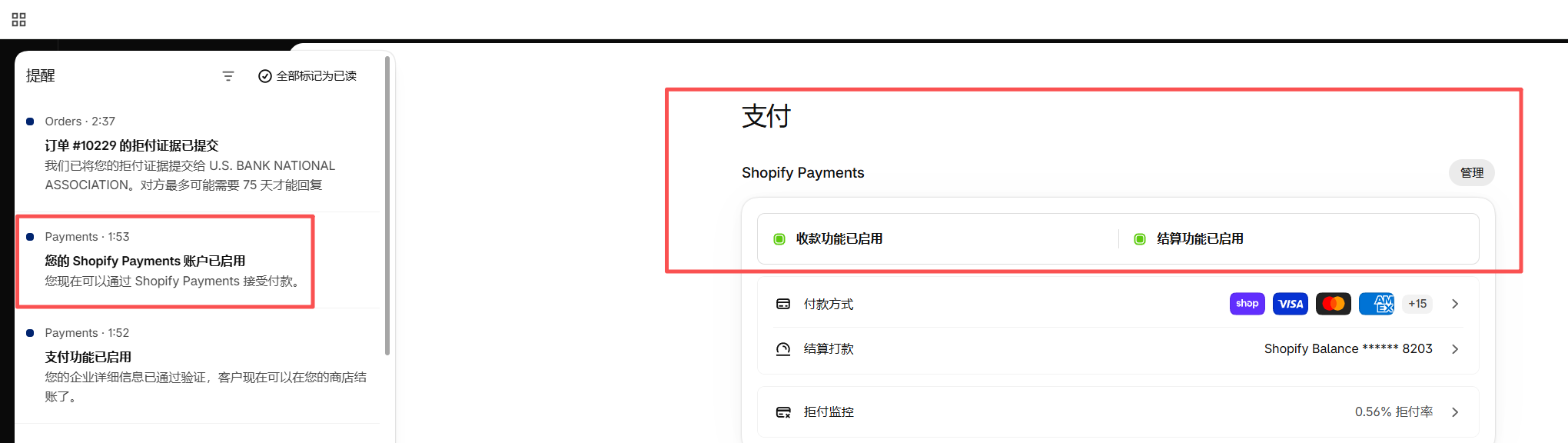
At that point, we could confirm factually: account functionality was restored, with both payment acceptance and payouts enabled in the admin.
Key Lessons From Handling This Case
First, read admin alerts and full emails together. The admin flags the restriction, while the email explains the exact compliance demand—especially when a deadline is attached.
Second, finish the actual setting changes before replying. Make sure product statuses, shipping zones, and your written explanation match, and keep checking replies rather than assuming one email ends the review.
Third, archive every round of evidence. Keeping notices, product statuses, shipping screenshots, replies, and final admin status makes future follow-ups and team reviews far clearer.
Fourth, close the record strictly on verified facts. Here, the platform confirmed active status and the admin showed both features enabled; separate issues such as potential fine waivers or bank deposit arrivals must still be verified on their own records.
That is why we continue documenting real operational records at Simbatch—leaving concrete playbooks for our team and other standalone-store operators.
More Real Operational Records Ahead & Official Sources
If you run a Shopify store and need help with store setup, configuration, or compliance troubleshooting, reach out through the Simbatch contact page with your current situation. For account onboarding steps, see our US Shopify Payments Setup Walkthrough or browse more guides in the Simbatch Resource Center.
This case reflects one specific store's experience; other stores must follow the notices and review outcomes in their own accounts.
Official Reference Sources
Sources verified: October 23, 2026. Case evidence based on the nine real screenshots in this article.
FAQ
What is the first thing to do after Shopify Payments is disabled?
Check both the admin banners and the full email sent to the account owner's inbox. Confirm whether the restriction affects payment acceptance, payouts, or both, then address the exact items listed in the email.
Will switching flagged products to Draft automatically restore the account?
In this case, handling the flagged products was only part of the remediation. Shopify also required removing the UK as a shipping destination and re-reviewed the account after our follow-up reply. A single action should not be treated as a universal restoration trigger.
Does every store need to remove UK shipping?
No. Removing UK shipping was a specific requirement stated in this store's notice. Other stores must respond based on their own catalog, markets, and platform email.
If Shopify emails that the account is active, does that mean held funds have arrived in the bank?
No. In this case we confirmed in the admin that payment acceptance and payouts were re-enabled, but the screenshots do not contain bank deposit records. Actual funds must always be verified in payout schedules and bank statements.
How long did recovery take, and was the potential fine waived?
These screenshots span notices and replies across different dates without complete start-to-end restriction timestamps, so I do not state a fixed recovery duration. Nor do the screenshots contain a final outcome on the fine waiver—account reactivation cannot be substituted for that conclusion.